Cancelling a Job
Cancelling a Job That Is Scanning
1.
Press [Cancel] on the screen that appears while the machine is scanning.
2.
Press [Yes].
|
NOTE
|
|
You can cancel a send job by pressing
 (Stop), while the job is being scanned. (Stop), while the job is being scanned. |
Cancelling a Job Being Sent or Waiting to Be Sent
1.
Press  (Status Monitor/Cancel).
(Status Monitor/Cancel). 2.
Press [Send] → [Job Status].
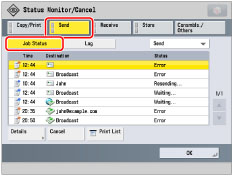
3.
Press the drop-down list → select [Fax].
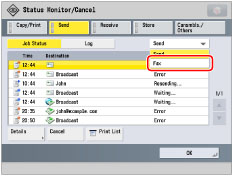
4.
Select the job that you want to cancel → press [Cancel].
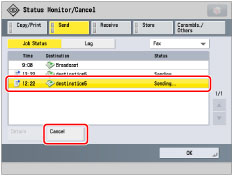
|
NOTE
|
|
You cannot select multiple jobs and cancel them all at once. Select and cancel one job at a time.
|
5.
Press [Yes].
Check the destinations for the fax job → press [Current Jobs] or [All Jobs]. If you do not want to cancel any job of the Sequential Broadcast, press [Current Jobs].
|
NOTE
|
|
The cancelled job appears as <NG> (No Good) on the Log screen.
|
|
NOTE
|
|
You can press
(Stop) to cancel a send job that is currently being scanned. |