Registering Folders Designated by Login Service as Personal Folders
This function enables you to register folders, which are designated by a login service, as personal folders.
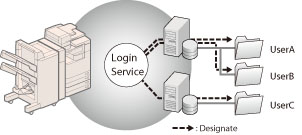
|
IMPORTANT
|
|
A login service which supports this function is required. For more information, contact your local authorized Canon dealer.
|
Administrator Settings
In this procedure, select [Use Login Server] to specify the personal folder.
1.
Press  (Settings/Registration).
(Settings/Registration).2.
Press [Function Settings] → [Send] → [Common Settings].
3.
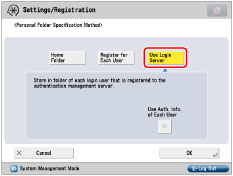
Press [Personal Folder Specification Method].
4.
Press [Use Login Server].
5.
Select whether to use authentication information of each user → [OK].

|
NOTE
|
|
You can use personal folders without specifying authentication information for each user when the conditions below are met. In that case, deselect [Use Auth. Info. of Each User].
When using the same authentication information for logging in to the machine and accessing the file server
When using a login service which supports Integrated Authentication
For information whether the login service you are using supports Integrated Authentication, contact your local authorized Canon dealer.
|
General User Settings
The following procedure is required to use authentication information of each user.
This section describes how to register the authentication information of each user for the folder designated by the login service.
1.
Log in to the machine.
2.
Press  (Main Menu) → [Scan and Send] →
  on the top right of the screen → [Register/Edit Information for Each User].
(Main Menu) → [Scan and Send] → on the top right of the screen → [Register/Edit Information for Each User].
|
NOTE
|
|
You can register user information from
on [Scan and Send] Basic Features screen, [Access Stored Files] Send screen, and [Fax/I-Fax Inbox] Send screen. |
3.
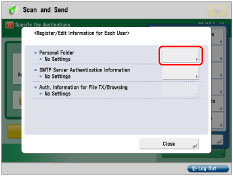
Press [Personal Folder].
4.
Enter [User Name] and [Password].

|
[User Name]:
|
Enter the login user name for accessing folders designated by the login service.
|
|
[Password]:
|
Enter the password for accessing the folders designated by the login service.
|
|
NOTE
|
|
The available protocol is SMB only.
The information for the personal folder obtained from the login service is displayed in [Host Name] and [Folder Path].
|
5.
Press [OK].
Folders designated by the login service are set as the personal folders.