Installing System Options
This section describes the procedure for installing system options.
Obtaining a License Key
Obtain a license key before installing a system option.
 |
To perform the procedure described in this section, you must log in to the machine as an administrator. |
 |
Prepare the License Access Number certificate that was included in the package. The license key can be obtained from the following website: http://www.canon.com/lms/license/ The following information is required to obtain a license key: License Access Number: Provided on the License Access Number certificate. Device Serial Number: Displayed in the bottom left of the screen when you press  (Counter Check) on the operation panel of the machine. (Counter Check) on the operation panel of the machine. |
Installing a System Option
You can register a license key and install a system option in the machine using the display.
1
Tap <Menu>.
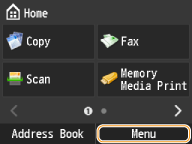
2
Tap <System Management Settings>.
If the logon screen appears, enter the correct ID and PIN using the numeric keys, and then press  . Logging on to the Machine
. Logging on to the Machine3
Tap <Register License>  <OK>.
<OK>.
<OK>.4
Enter the license key using  -
-  (numeric keys).
- (numeric keys).Details of each item are shown below.
 / / | Tap to move the position of the cursor. |
 | Press when you enter an incorrect number. The last number entered is deleted, enabling you to enter the correct number. |
If the message <The license key is incorrect. Enter the license key again.> appears, enter the correct license key.
The license key cannot be registered if the message <The feature required for installation is not present.> appears. Tap <Close> cancel the registration.
cancel the registration.5
Tap <Register> <Close>.
<Close>.The registered function becomes available after you restart the machine.
Turn OFF the machine, wait for at least 10 seconds, and turn it back ON.