激活 Send Setting Utility
使用 Send Setting Utility 的准备工作。
本节介绍如何激活 Send Setting Utility。
您可以使用以下激活方法之一。
"从网络浏览器激活"
|
须知
|
使用 Send Setting Utility 之前检查本机的 IP 地址。
如果不确定本机的 IP 地址,请询问网络管理员。
|
系统要求
Windows
操作系统
Windows XP
Windows Vista
Windows 7
Windows 8
网络浏览器
Microsoft Internet Explorer 7.0 或更高版本
Macintosh
操作系统
Mac OS 10.5.8 或更高版本(Classic 环境除外)
网络浏览器
Safari 3.2.1 或更高版本
通过 [发送功能设置工具] 激活
使用用户软件 CD-ROM 中提供的发送设置工具激活 Send Setup Utility。
发送设置工具
发送设置工具支持以下系统环境。
操作系统
Windows XP
Windows Vista
Windows 7
Windows 8
Windows Server 2003
Windows Server 2008
Windows Server 2012
显示
SVGA 显示器,支持至少 256 色
屏幕分辨率设置为至少 800 x 600 像素
1
将用户软件 CD-ROM 插入计算机的插槽中。
2
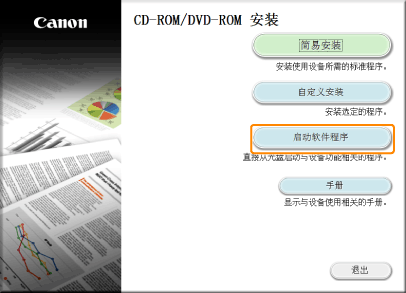
单击 [启动软件程序]。
3
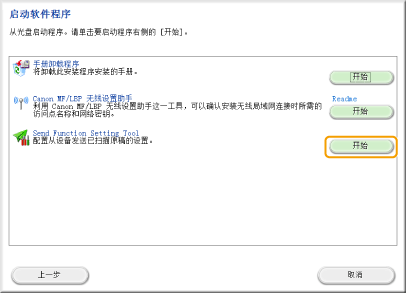
单击 [Send Function Setting Tool] 的 [开始]。
4
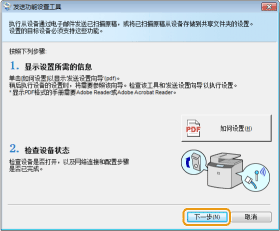
单击 [下一步]。
5
检查本机上显示的设备列表,然后单击 [下一步]。
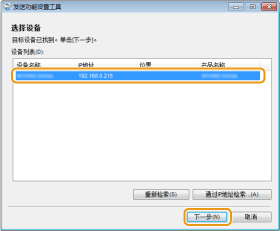
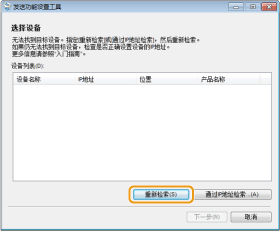
如果本机上没有显示设备列表:
|
(1)
|
单击 [重新检索] 或 [通过IP地址检索]。
单击 [重新检索] 时,进到 (3)。
|
|
(2)
|
输入本机的 IP 地址或主机名,然后单击 [确定]。
 |
|
(3)
|
检查本机上显示的设备列表,然后单击 [下一步]。
|
如果列表中显示多个设备:
|
(1)
|
从设备列表中选择本机,然后单击 [确定]。
|
6
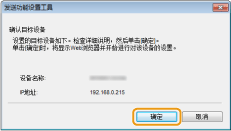
确定设置,然后单击 [确定]。
从网络浏览器激活
1
启动网络浏览器。
2
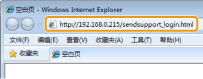
在地址栏中输入“http://<本机的 IP 地址>/sendsupport_login.html”,然后按键盘上的 [Enter] 键。
输入示例:http://192.168.0.215/sendsupport_login.html