Configuring Send Settings
This section describes how to configure the send settings.
See the following for more information:
"Options"
The Steps to Take for Configuring the Send Settings
Follow the steps in the procedure below to configure the send settings.
The procedure describes the steps to change the "ECM TX" setting.
1
Press [ ] (Menu).
] (Menu).2
Press [ ] or [
 ] to highlight <Fax TX Settings>, and then press [OK].
] or [] to highlight <Fax TX Settings>, and then press [OK].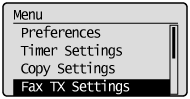
3
Press [] or [] to highlight <TX Function Settings>, and then press [OK].
] or [] to highlight <TX Function Settings>, and then press [OK].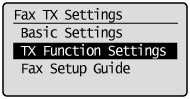
4
Press [] or [] to highlight <ECM TX>, and then press [OK].
] or [] to highlight <ECM TX>, and then press [OK].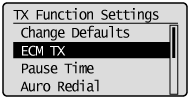
5
Press [] or [] to highlight <Off> or <On>, and then press [OK].
] or [] to highlight <Off> or <On>, and then press [OK].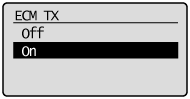
 |
Select <Apply> when <Apply> appears on the screen after you have specified the setting and press [OK].
|
6
Press [] (Menu) to close the Menu screen.
] (Menu) to close the Menu screen.The procedure is complete.
Options
Configure the following options to send a fax:
|
Fax Settings
|
|
|
Basic Settings
|
|
|
TX Function Settings
|
|
|
"ECM TX"
|
|