Printing Cannot Be Performed (via the Print Server)
If you cannot print when the printer is used via the print server, check the problem following the questions below.
<Question 1> Is the printer turned ON?
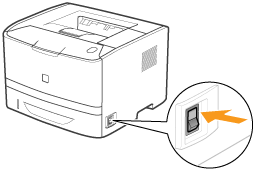
|
ON
|
To <Question 2>
|
|
OFF
|
Turn the printer ON.
|
|
Cannot be turned ON
|
<Question 2> Check the indicators on the printer unit.
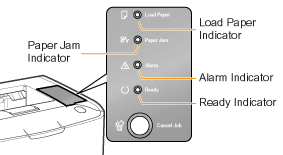
|
The
 (Load Paper) indicator is blinking. (Load Paper) indicator is blinking. |
Load paper.
|
|
The
 (Paper Jam) indicator is blinking. (Paper Jam) indicator is blinking. |
|
|
The
 (Alarm) indicator is on. (Alarm) indicator is on. |
|
|
The
(Alarm) indicator is blinking. |
|
|
The
 (Ready) indicator is on. (Ready) indicator is on. |
To <Question 3>
|
|
The
(Ready) indicator is blinking. |
The printer is operating. Please wait a moment.
|
<Question 3> Is the printer connected to the print server properly?
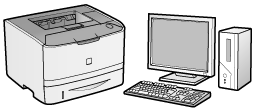
|
Connected
|
To <Question 4>
|
|
Unconnected
|
Connect the cable properly.
|
<Question 4> Can your computer be connected to the print server or the shared printer?
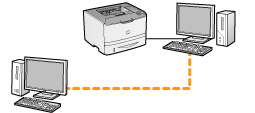
|
Can be connected
|
To <Question 5>
|
|
Cannot be connected
|
<Question 5> Check the following points.
The print server is connected to the network properly.
 "
"Printing can be performed from the print server.

If printing does not work, proceed to <Question 6>.
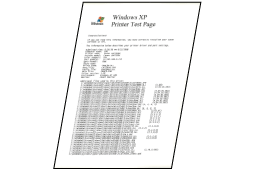
<Question 6> Can you print a test page in Windows?
|
Printable
|
There is no problem with the printer and driver.
Check the printing preferences in the application.
|
|
Not printable
|
To <Question 7>
|
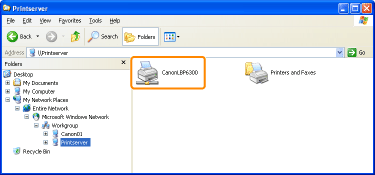
<Question 7> Is the printer on the print server displayed on the network?
|
Displayed
|
To <Question 8>
|
|
Not displayed
|
Ask your network administrator about the problem.
|
<Question 8> Install the printer driver again.
 |
When installing the printer driver again, change the installation method.
If you performed the local installation (installing the printer driver with the CD-ROM)
→ Change the installation method to the download installation (installing the printer driver without the CD-ROM).
If you performed the download installation (installing the printer driver without the CD-ROM)
→ Change the installation method to the local installation (installing the printer driver with the CD-ROM).
|
If printing does not work, proceed to <Question 9>.
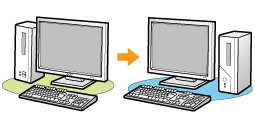
<Question 9> Can another client print?
|
Printable
|
Make resident software invalid including security software.
|
|
Not printable
|
Contact your local authorized Canon dealer.
|