
Registering Frequently Used Fax Settings
You can register up to four frequently used combinations of fax settings. By simply selecting a registered setting combination when it is needed, you can eliminate the need to configure the same settings every time you send a fax, such as if you frequently set the number of recipients to 5, set 2-sided original, and increase the sharpness when faxing. You can register the setting combinations as <Settings 1> to <Settings 18>.
<Fax>  <Favorite Settings> <Register> <OK> <Settings 1> to <Settings 18> Tap each setting and set the value <Apply> <Yes> <Yes> <OK>
<Favorite Settings> <Register> <OK> <Settings 1> to <Settings 18> Tap each setting and set the value <Apply> <Yes> <Yes> <OK>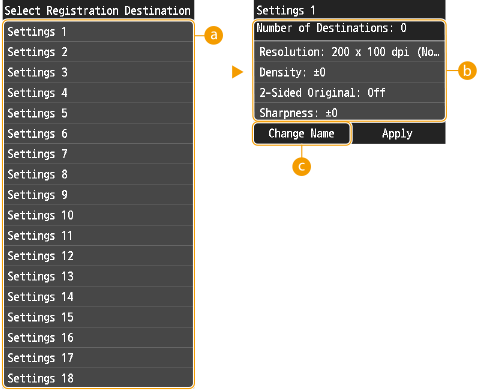
 <Settings 1> to <Settings 18>
Register frequently used combinations of recipients and fax settings as one of the modes. To edit the settings for a mode that has already been registered, tap <Edit/Delete>, select the mode, and edit the settings.
 Settings
Configure your frequently used settings. Various Fax Settings
 <Change Name>
Change the setting name.
|
If you want to delete a registered setting, tap <Fax> <Favorite Settings> <Edit/Delete> <Delete> tap the setting <Yes> <Yes>.If you want to use a registered setting, tap <Fax> <Favorite Settings> tap the setting.Registered settings are saved even when the machine is turned OFF. You can change the settings of a mode after it is activated. For any setting you have registered, you can later change any of its setting values other than the destination. If a destination registered in a setting is deleted from the Address Book, it is also deleted from the registered setting. Any editing in the Address Book of a destination in a registered setting is not applied to the registered setting. |