Registering Shortcut Keys
You can create shortcuts to frequently used functions in [Options] in the Copy screen. You can also directly recall buttons registered in [Favorite Settings].
These shortcuts then appear on the Copy Basic Features screens.
This mode can be set when the Copy function is available for use. For information on the optional products required to use the Copy function, see "Optional Products Required for Each Function."
Storing Shortcut Keys
1.
Press  .
.
. 2.
Press [Function Settings] → [Copy] → [Register Options Shortcuts].
3.
Select the button to register.
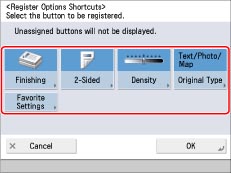
4.
Select the [Options] mode you want to assign as a shortcut → press [OK].
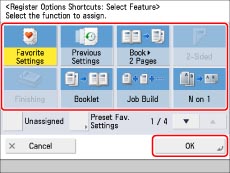
If you do not want to assign an option, select [Unassigned].
5.
Press [OK].
Assigning a Shortcut to a Registered [Favorite Settings] Button
1.
Press .
.2.
Press [Function Settings] → [Copy] → [Register Options Shortcuts].
3.
Select the button to register.
4.
Press [Preset Fav. Settings] → select assigned Favorite Settings → press [OK].
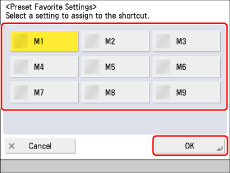
|
NOTE
|
|
To use this setting, you must first register Favorite Settings. (See "Assigning Shortcuts.")
|
5.
Press [OK].