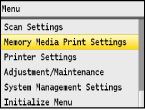
Memory Media Print Settings
 |
|
All the settings are about the memory media print listed with short descriptions. Default settings are marked with a dagger (
 ). ). |
|
NOTE
|
Asterisks (*)Settings marked with "*1" are only available when the optional paper drawer (drawer 2) is attached.
Settings marked with "*2" are only available for the MF8580Cdw.
|
Change Default Settings
Specify the USB Print settings. The selected settings are used as the default settings of the USB Print function. Changing Default USB Print Settings
|
Number of Copies
1
to 99Paper
Multi-Purpose Tray
Drawer 1
Drawer 2*1
N on 1
Off
2 on 1
4 on 1
2-Sided*2
Off
Book Type
Calendar Type
Print Date
Off
On
Print File Name
Off
On
Original Type
Photo Priority
Text Priority Brightness
Five Levels
Halftones
Gradation
Error Diffusion
|
Default Display Settings 
Select whether to display a list of file names or thumbnails for previewing when accessing files in a USB memory device.
|
Details
Images
|

 <Memory Media Print Settings>
  <Default Display Settings> Select <Details> or <Images>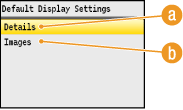
 <Details>
Displays file names and dates in list form.
 <Images>
Displays thumbnails for previewing.
File Sort Default Settings
Select whether to display files in a USB memory device in ascending or descending order of file name or date.
|
Name (Ascending)
Name (Descending)
Date/Time (Ascending)
Date/Time (Descending)
|
<Memory Media Print Settings> <File Sort Default Settings> Select the order of files that are displayed File Name Display Format
Select whether to display short or long text for file names that are stored in a USB memory device.
|
Short File Name
Long File Name |
<Memory Media Print Settings> <File Name Display Format> Select <Short File Name> or <Long File Name> 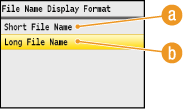
<Short File Name>
Shortens a file name to as few as eight characters. To distinguish files that have similar names, numbers such as "~1" or "~2" are added at the end of the file names.
<Long File Name>
Displays a file name up to 20 characters.
|
NOTE
|
|
The number of characters described above does not include the characters in file extensions, such as ".jpg".
|