Selecting a File Format
 |
|
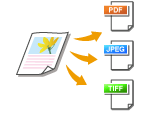
You can select from four file formats into which documents are converted: <PDF>, <PDF (Compact)>, <TIFF>*, and <JPEG>*. Scanned documents are converted into the file format specified here, and then sent to the specified destination.
* Not available when sending e-mails
|

 Specify destinations or connect the USB memory device <File Format>
  Select a file format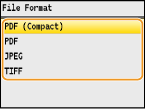
|
NOTE
|
|
<PDF (Compact)> compresses photos and illustrations on documents more than <PDF>. The file will be smaller, but the image quality of some documents or the number of documents that can be scanned at once may be lower. If you select <PDF (Compact)>, you can specify the compression level.
For the resolutions of each file format, see Specifications for Scanning to Shared Folders (MF8580Cdw Only).
|
 Detailed Settings for <PDF (Compact)>
 <Scan Settings> <Output File Image Settings> <PDF (Compact) Image Quality Level> Select the type of your documents Specify the settings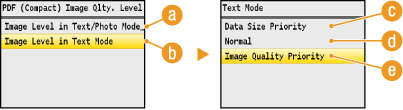
 <Image Level in Text/Photo Mode or Photo Mode>
Select when scanning documents that contain photos.
 <Image Level in Text Mode>
Select when scanning documents that only contain text.
 <Data Size Priority>
The data size is highly compressed and reduced, but the image quality is low.
 <Normal>
The compression ratio and the image quality are adjusted to an intermediate setting between <Data Size Priority> and <Image Quality Priority>.
 <Image Quality Priority>
The image quality improves, but the data compression ratio decreases and data size is large.