Confirming a Key Pair and User Certificate
The following procedure describes how the administrator can confirm the key pairs and user certificates for all users.
Install the key pair and user certificate used for adding a user signature to PDF or XPS files from a computer. (See "Installing a Certificate File.")
The following procedure can be performed when the User Signature PDF/XPS function is available for use. For information on the optional products required to use the User Signature PDF/XPS function, see "Optional Products Required for Each Function."
1.
Press  (Settings/Registration).
(Settings/Registration).2.
Press [Management Settings] → [Device Management] → [Certificate Settings].
3.
Press [Key and Certificate List] → [Key and Certificate List for Users] → perform the following operation.
If  is displayed to the left of a key pair, it is corrupted or invalid. After erasing the key pair, install a key pair and user certificate in the machine from a computer. (See "Installing a Certificate File.")
is displayed to the left of a key pair, it is corrupted or invalid. After erasing the key pair, install a key pair and user certificate in the machine from a computer. (See "Installing a Certificate File.")If you want to confirm a user certificate:
Select the key pair for the user certificate you want to confirm → press [Certificate Details] → [Verify Cert.].
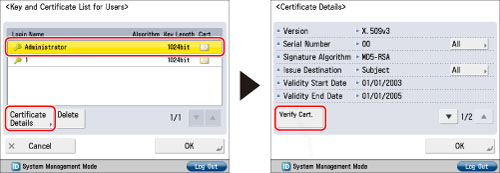
If [Verify Cert.] is grayed out or <The key is corrupted or invalid.> is displayed, you cannot use the key pair. After erasing the key pair, install a key pair and user certificate in the machine from a computer. (See "Installing a Certificate File.")
Press [OK].
If you want to delete a registered key pair:
Select the key pair to delete → press [Delete].
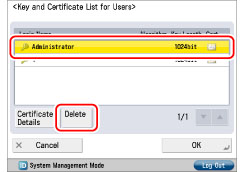
Press [Yes].
4.
Press [OK] → [OK] → [OK].
|
NOTE
|
|
You can also use the Remote UI to confirm the key pairs and user certificates for all users. For more information, see "Installing a Certificate File."
For information on how a general user can display the user certificate, see "Checking a Device Signature/User Signature Certificate." However, in this case, only the user certificate for the user who is currently logged in is displayed. User certificates for other users cannot be displayed. The user certificate also cannot be deleted from this screen. A general user must use the Remote UI to delete their user certificate. (See "Installing a Certificate File.")
|