Checking the Detailed Information for/Displaying an Image/Deleting a File in the Memory RX Inbox
Checking the Detailed Information for a File
1.
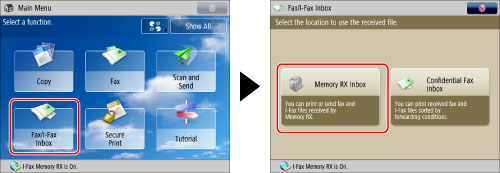
Press [Fax/I-Fax Inbox] → [Memory RX Inbox].
2.
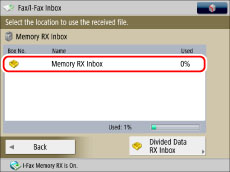
Press [Memory RX Inbox].
3.
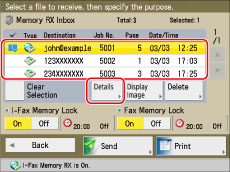
Select a file to check → press [Details].
|
NOTE
|
|
If you select multiple files and press [Details], only the details of the selected (highlighted) file appear.
|
Displaying the Image of a File
1.
Press [Fax/I-Fax Inbox] → [Memory RX Inbox].
2.
Press [Memory RX Inbox].
3.
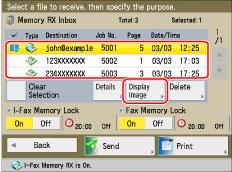
Select the file that you want to display → press [Display Image].
4.
Press  or
or  → select the page to check → check the image.
or → select the page to check → check the image.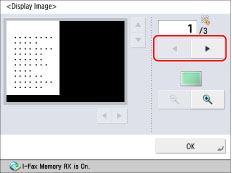
You can press  (reduce) or
  (enlarge) to zoom in or out.
(reduce) or (enlarge) to zoom in or out.You can press , ,  , or
, or  to specify the area to display when you zoom in or out on the page.
, , , or to specify the area to display when you zoom in or out on the page.|
NOTE
|
|
If you select multiple files, only the contents of the selected (highlighted) files are displayed.
|
Deleting a File
1.
Press [Fax/I-Fax Inbox] → [Memory RX Inbox].
2.
Press [Memory RX Inbox].
3.
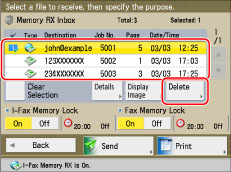
Select the file that you want to delete → press [Delete].
|
NOTE
|
|
You can cancel a selection by selecting the file again.
To deselect all files, press [Clear Selection]. ([Clear Selection] changes to [Select All (Max 32 Files)].)
|
4.
Press [Yes].
|
NOTE
|
|
You cannot delete multiple files simultaneously. To delete multiple files, select and delete one file at a time.
|