The uninstaller starts.
 Uninstalling
When you no longer need installed printer drivers or the Product Extended Survey Program, you can uninstall them to delete them from your computer.
Uninstalling Printer Drivers
1
Log on to the computer with an administrator account.
2
Display [Programs and Features] or [Add or Remove Programs]. Displaying [Programs and Features] or [Add or Remove Programs]
3
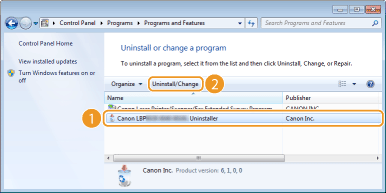
Select the printer driver that you want to uninstall, and click [Uninstall/Change] or [Change/Remove].
|
The uninstaller starts. |

If you cannot find the printer driver that you want to uninstall
Start the uninstaller from the User Software CD-ROM/DVD-ROM or from the printer driver file that you downloaded.
|
1
|
Insert the User Software CD-ROM/DVD-ROM into the drive on the computer.
To start the uninstaller from a printer driver file that you downloaded, carry out the following step.
|
|
2
|
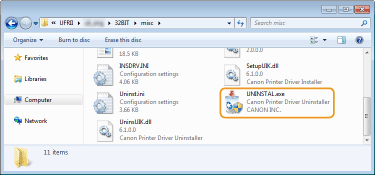
Open the folder where the uninstaller is stored.
32-bit operating system
[UFRII]  [uk_eng] [32BIT] [misc] folders of the CD-ROM/DVD-ROM or downloaded file [uk_eng] [32BIT] [misc] folders of the CD-ROM/DVD-ROM or downloaded file64-bit operating system
[UFRII] [uk_eng] [x64] [misc] folders of the CD-ROM/DVD-ROM or downloaded fileIf you do not know whether to specify the 32-bit version or the 64-bit version for Windows Vista/7/8/Server 2008/Server 2012, see Checking the Bit Architecture. |
|
3
|
Double-click "UNINSTAL.exe."
 |
4
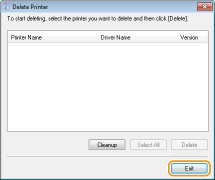
Select the printer that you want to uninstall, and click [Delete].
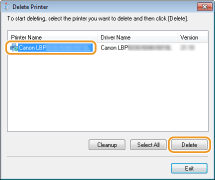

If you click [Cleanup], then all files, directory information and other data related to all printers are deleted, not only for the selected printer but for all printers in the list. Normally you should use [Delete] to uninstall printer drivers. Click [Cleanup] when no printer is displayed in the list.
5
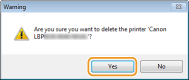
Click [Yes].
|
|
The uninstall starts.
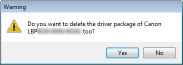
When the following screen appears, click [Yes] or [Yes To All].
  |
6
Click [Exit].
Uninstalling the Product Extended Survey Program
1
Log on to the computer with an administrator account.
2
Display [Programs and Features] or [Add or Remove Programs]. Displaying [Programs and Features] or [Add or Remove Programs]
3
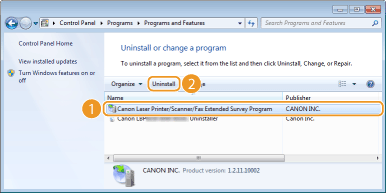
Select [Canon Laser Printer/Scanner/Fax Extended Survey Program], and click [Uninstall] or [Remove].
4
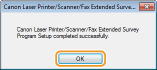
Click [OK].