Entering Text
Use the display and numeric keys to enter text and values.
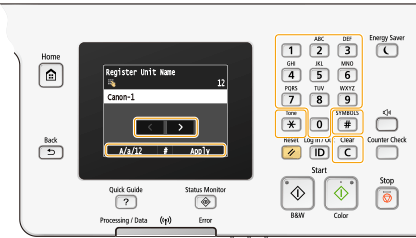
Switching the Type of Text
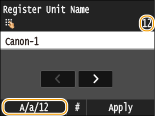
Tap <A/a/12> to switch the type of text that is entered. The currently selected type of text is indicated by the "A", "a", or "12" displayed above and to the right of the text input field.
 |
|
You can also press
 to switch the type of text. to switch the type of text. |
Types of Text That Can Be Entered
Text that can be entered is listed below.
|
Key
|
A
|
a
|
12
|
 |
@ . - _ /
|
1
|
|
 |
ABC
|
abc
|
2
|
 |
DEF
|
def
|
3
|
 |
GHI
|
ghi
|
4
|
 |
JKL
|
jkl
|
5
|
 |
MNO
|
mno
|
6
|
 |
PQRS
|
pqrs
|
7
|
 |
TUV
|
tuv
|
8
|
 |
WXYZ
|
wxyz
|
9
|
 |
(Not available)
|
0
|
|
 |
(space) -.*#!",;:^`_=/|'?$@%&+\~()[]{}<>
|
(Not available)
|
|
|
|
|
Press
or tap <#> when the type of text that is entered is <A> or <a> to display enterable symbols in the screen. Tap symbols to enter. |
Deleting Text
One character is deleted each time  is pressed. Press and hold to delete all of the entered text.
is pressed. Press and hold to delete all of the entered text.Moving the Cursor (Entering a Space)
Tap  or
or  to move the cursor. To enter a space, move the cursor to the end of the text, and tap.
or to move the cursor. To enter a space, move the cursor to the end of the text, and tap.Example of Entering Text and Numbers
Example: "Canon-1"
|
1
|
Tap <A/a/12> repeatedly until <A> is selected.
|
|
2
|
Press
repeatedly until the letter "C" is selected. |
|
3
|
Tap <A/a/12> repeatedly until <a> is selected.
|
|
4
|
Press
repeatedly until the letter "a" is selected. |
|
5
|
Press
repeatedly until the letter "n" is selected. |
|
6
|
Press
repeatedly until the letter "o" is selected. |
|
7
|
Press
repeatedly until the letter "n" is selected. |
|
8
|
Press
repeatedly until the symbol "-" is selected. |
|
9
|
Tap <A/a/12> repeatedly until <12> is selected.
|
|
10
|
Press
. |
|
11
|
Tap <Apply>.
|
Entering Characters Using a USB Keyboard
When  is displayed on the screen, you can connect a keyboard to the USB port for USB devices on the Back Side and enter text from the keyboard. When using a keyboard, you can still use the number keypad.
is displayed on the screen, you can connect a keyboard to the USB port for USB devices on the Back Side and enter text from the keyboard. When using a keyboard, you can still use the number keypad.|
|
|
Some keys on the USB keyboard, such as the [Backspace], [Home] and [End] keys, cannot be used. When keys that cannot be used are pressed, nothing is entered or changed.
To delete text, press the [Delete] key.
Pressing the [RETURN/ENTER] key completes text entry in the same way as tapping <Apply>.
You can specify the type of keyboard layout (US layout or UK layout). English Keyboard Layout
You can disconnect the USB keyboard from the machine at any time. No special operation is required to disconnect it.
Depending on the display language, you may not be able to enter some characters correctly.
The USB keyboard may not operate correctly depending on the type of keyboard.
|