Configuring Port Settings over a TCP/IP Connection
Configure port settings on your computer to print to the machine.
|
Configure port settings on your computer when:
|
Action
|
|
Installing the printer driver using [Add
Printer]. |
If the installed printer driver uses a different port than the one assigned to the machine, you must configure the port to match the machine's IP address.
|
|
Changing the IP address of the machine.
|
When the machine's IP address is changed, you must reconfigure the port to match the IP address of the machine.
|
|
NOTE
|
The dialog box that appears on your computer:The dialog box may vary slightly, depending on the version of your operating system.
|
1
Open the printer folder.
2
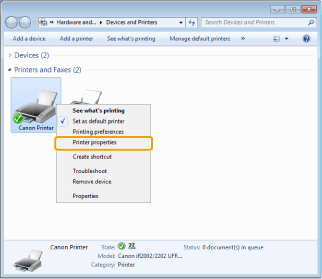
Right-click the icon for the machine and select [Printer properties] (or [Properties]).
3
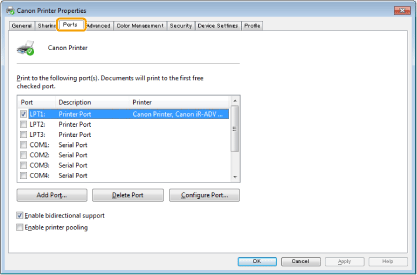
Click the [Ports] tab.
4
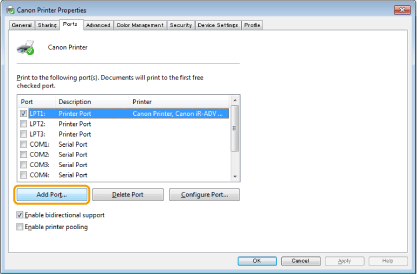
Click [Add Port].
5
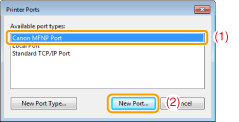
Select [Canon MFNP Port] for [Available port types] and click [New Port].
6
Click [Auto Detect].
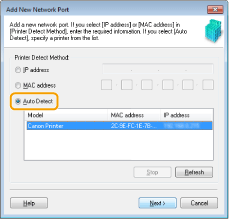
 When you cannot perform Auto Detect: When you cannot perform Auto Detect: |
|
Enter the IP address or MAC address of the machine manually.
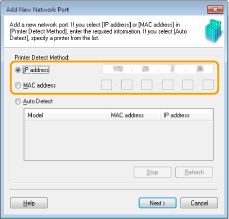 You can check the IP address of the machine in "Confirming IP Address Settings."
You can check the MAC address of the machine in "Checking the MAC Address."
|
7
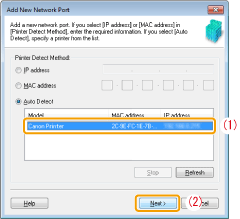
Select the detected printer and click [Next].
8
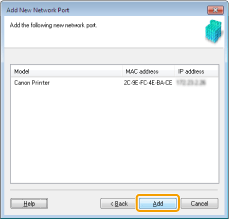
Click [Add].
9
Click [Finish].
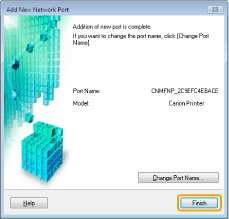
10
Click [Close].
11
Click [Apply].