Displaying the Notify to Clean Original Scanning Area Screen
The machine can detect if dirt etc. on the original scanning area of the feeder (DADF-AM1) causes streaks to appear on output copy paper, and will display a message prompting you to clean the original scanning area. This message is displayed when setting an original on the feeder (DADF-AM1). If you want to clean the original scanning area of the feeder (DADF-AM1), see "Manual Feeder Cleaning."
|
NOTE
|
|
This function is only for when the optional feeder (DADF-AM1) is attached to the machine.
|
1
Press [ ] (Settings/Registration).
] (Settings/Registration).2
Press [ ] or [
 ] to highlight <Preferences>, and then press [OK].
] or [] to highlight <Preferences>, and then press [OK].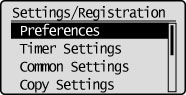
3
Press [] or [] to highlight <Display Settings>, and then press [OK].
] or [] to highlight <Display Settings>, and then press [OK].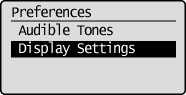
4
Press [] or [] to highlight <Notify to Clean Original Scanning Area>, and then press [OK].
] or [] to highlight <Notify to Clean Original Scanning Area>, and then press [OK].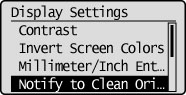
5
Press [] or [] to highlight <Off> or <On>, and then press [OK].
] or [] to highlight <Off> or <On>, and then press [OK].|
<Off>
|
Do not display a message to clean the original scanning area.
|
|
<On>
|
Display a message to clean the original scanning area.
|
6
Press [] (Settings/Registration) to close the Settings/Registration screen.
] (Settings/Registration) to close the Settings/Registration screen.