Accessing the Additional Functions Menu
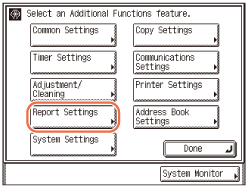
When you press  (Additional Functions), the Additional Functions menu appears. The Additional Functions menu enables you to change and customize the machine’s various settings. When these settings are changed or specified, they are saved and retained until they are changed again. The Additional Functions menu consists of the following groups of settings:
(Additional Functions), the Additional Functions menu appears. The Additional Functions menu enables you to change and customize the machine’s various settings. When these settings are changed or specified, they are saved and retained until they are changed again. The Additional Functions menu consists of the following groups of settings:Common Settings:
You can make the settings that are fundamental to the machine operations. (Specifying Common Settings)
You can make the settings that are fundamental to the machine operations. (Specifying Common Settings)
Copy Settings:
You can make the settings related to the Copy function. (Customizing Settings)
You can make the settings related to the Copy function. (Customizing Settings)
Timer Settings:
You can make the settings related to the machine’s digital clock and timer system. (Timer Settings)
You can make the settings related to the machine’s digital clock and timer system. (Timer Settings)
Communications Settings:
Specify how the machine sends/receives documents to/from other devices. (Customizing the Machine's Settings)
Specify how the machine sends/receives documents to/from other devices. (Customizing the Machine's Settings)
Adjustment/Cleaning:
Use these functions to clean or make adjustments to the machine. (Routine Cleaning, Adjusting the Machine Settings)
Use these functions to clean or make adjustments to the machine. (Routine Cleaning, Adjusting the Machine Settings)
Printer Settings:
You can make the settings related to the Print function. (Customizing Settings)
You can make the settings related to the Print function. (Customizing Settings)
Report Settings:
You can make settings for printing various kinds of reports. (Printing Communication Reports and Lists)
You can make settings for printing various kinds of reports. (Printing Communication Reports and Lists)
Address Book Settings:
Register and edit contacts information here. (Specifying Destinations Easily and Quickly)
Register and edit contacts information here. (Specifying Destinations Easily and Quickly)
System Settings:
Settings related to network connectivity and security management are available. (System Settings)
Settings related to network connectivity and security management are available. (System Settings)
|
IMPORTANT
|
|
Depending on the machine configuration, some functions and settings may not be available.
To access the System Settings, you must enter the System Manager ID and System Password. For more information, see Before You Start.
|
|
NOTE
|
|
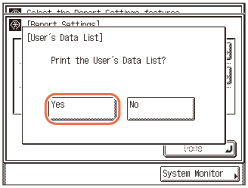
The current settings of the Additional Functions can be printed in list form. (Printing the User’s Data List)
|
Printing the User’s Data List
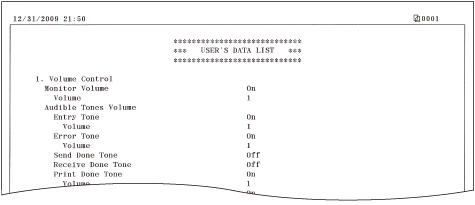
The User’s Data List enables you to check the current settings of the machine.
1
Press  (Additional Functions).
(Additional Functions).The Additional Functions menu appears.
2
Press [Report Settings].
3
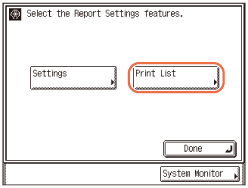
Press [Print List].
4
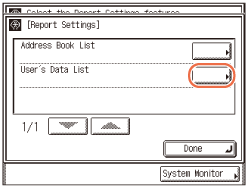
Press [User’s Data List].
5
Press [Yes] to print the User’s Data List.
To quit, press [No].
The User’s Data List is printed.