Reception Related Items
This section describes the reception features that can be customized to your preferences.
Printing Received Documents on Both Sides of Paper
You can print received documents on both sides of the paper, enabling you to save paper.
|
NOTE
|
|
The default setting is ‘Off’.
|
1
Press  (Additional Functions).
(Additional Functions).The Additional Functions menu appears.
2
Press [Communications Settings].
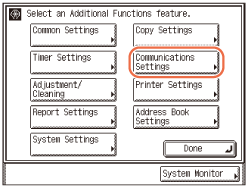
3
Press [RX Settings] under <Common Settings>.
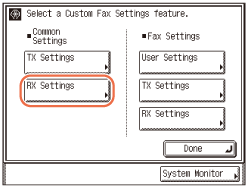
4
Press [2-Sided Print].
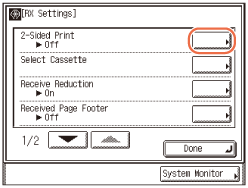
5
Select [On] or [Off] → press [OK].
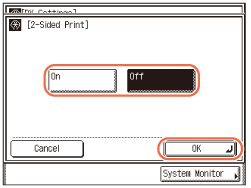
6
Press  (Reset) to return to the top screen.
(Reset) to return to the top screen.Specifying the Methods for Printing Received Documents (Paper Drawer Selection)
You can set how the machine prints documents when there is no paper matching the size of the received document.
The four available printing methods (Switches A, B, C, and D) are described below.
Switch A
The image is printed over two sheets of paper that have the same combined size as the received document.
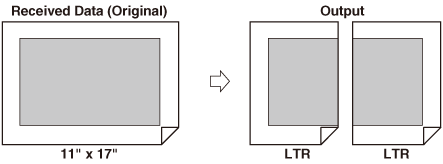
Switch B
The image is printed with blank space on paper that has the same width as the received document.
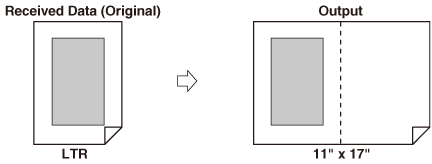
Switch C
The image is reduced and printed on paper that differs in width from the received document.
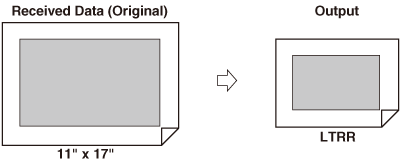
Switch D
The image is printed on paper that is larger in size than the received document.
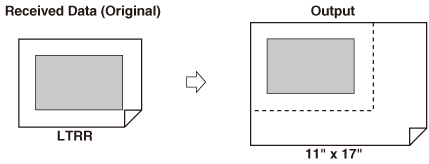
|
NOTE
|
|
For more information on selecting a paper source for printing received documents, see Configuring the Machine's Basic Settings.
The default setting for all switches is ‘On’.
|
1
Press (Additional Functions) → [Communications Settings] → [RX Settings] under <Common Settings>.
(Additional Functions) → [Communications Settings] → [RX Settings] under <Common Settings>.For help, see steps 1 to 3 in Printing Received Documents on Both Sides of Paper.
2
Press [Select Cassette].
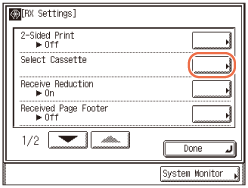
3
Select [On] or [Off] for the respective switches → press [OK].
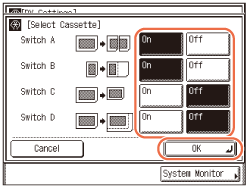
4
Press (Reset) to return to the top screen.
(Reset) to return to the top screen.Reducing a Received Document
You can set the machine to automatically reduce the size of received documents so that the whole document is printed within the printable area of the paper.
|
NOTE
|
|
The default settings are:
Receive Reduction: ‘On’
RX Reduction: ‘Auto’
Reduce %: ‘90%’
Reduce Direction: ‘Vertical Only’
|
1
Press (Additional Functions) → [Communications Settings] → [RX Settings] under <Common Settings>.
(Additional Functions) → [Communications Settings] → [RX Settings] under <Common Settings>.For help, see steps 1 to 3 in Printing Received Documents on Both Sides of Paper.
2
Press [Receive Reduction].
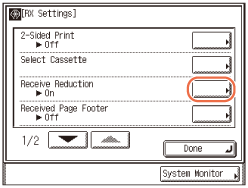
3
Select [On] or [Off].
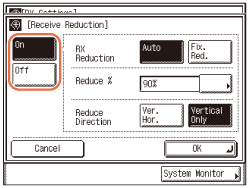
|
|
[On]:
|
Reduces received documents.
|
|
[Off]:
|
Does not reduce received documents.
|
If you select [On]:
|
1
|
Specify each setting → press [OK].
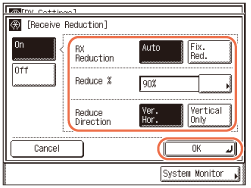 |
<RX Reduction>:
|
|
[Auto]:
|
The image is automatically reduced by a suitable reduction ratio.
|
|
[Fix. Red.]:
|
The image is reduced by the reduction ratio set in for <Reduce %>.
|
<Reduce %>:
If you selected [Fix. Red.], select 75%, 90%, 95%, and 97% for the reduction ratio.
<Reduce Direction>:
|
|
[Ver. Hor.]:
|
The image is reduced in both the vertical and horizontal directions.
|
|
[Vertical Only]:
|
The image is reduced in the vertical direction only.
|
If you select [Off]:
|
1
|
Press [OK].
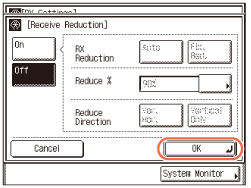 IMPORTANT:
If you press [Off], the received document is not automatically reduced to fit the size of the paper. If the size of the received document exceeds the printable area, the image is divided into equal sections and printed onto separate sheets of paper.
Regardless of the settings you set for <Receive Reduction>, if the area of the image which exceeds the printable area is less than 1/2" (12 mm), it will not be printed.
|
4
Press (Reset) to return to the top screen.
(Reset) to return to the top screen.Printing Footer Information on a Received Document
You can set whether the machine prints the date, day, and time received, transaction number, and page number at the bottom of the received document.
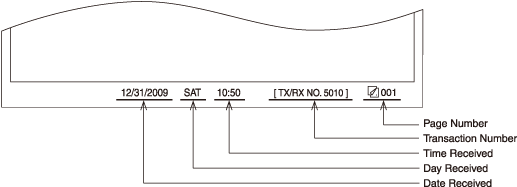
|
NOTE
|
|
The default setting is ‘Off’.
|
1
Press (Additional Functions) → [Communications Settings] → [RX Settings] under <Common Settings>.
(Additional Functions) → [Communications Settings] → [RX Settings] under <Common Settings>.For help, see steps 1 to 3 in Printing Received Documents on Both Sides of Paper.
2
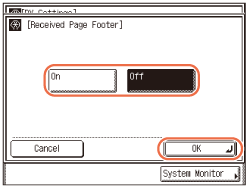
Press [Received Page Footer].
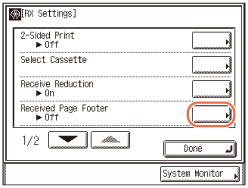
3
Select [On] or [Off] → press [OK].
4
Press (Reset) to return to the top screen.
(Reset) to return to the top screen.Specifying the Gamma Value for Receiving Color Documents
You can set the gamma value to use when receiving documents. This enables you to print received documents with the appropriate image quality.
|
NOTE
|
|
The default setting is ‘Gamma 1.8’.
|
1
Press (Additional Functions) → [Communications Settings] → [RX Settings] under <Common Settings>.
(Additional Functions) → [Communications Settings] → [RX Settings] under <Common Settings>.For help, see steps 1 to 3 in Printing Received Documents on Both Sides of Paper.
2
Press [ ] or [
 ] until [Gamma Value for YCbCr Received Jobs] appears → press [Gamma Value for YCbCr Received Jobs].
] or [] until [Gamma Value for YCbCr Received Jobs] appears → press [Gamma Value for YCbCr Received Jobs].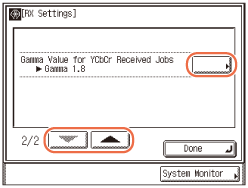
3
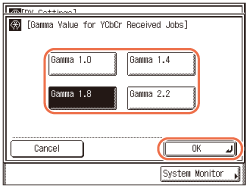
Select [Gamma 1.0], [Gamma 1.4], [Gamma 1.8], or [Gamma 2.2] → press [OK].
4
Press (Reset) to return to the top screen.
(Reset) to return to the top screen.Receiving with Error Correction Mode (ECM Reception)
You can receive incoming documents using ECM (Error Correction Mode).
ECM is a mode which automatically corrects errors in an image while it is being received.
If the reception speed appears to be extremely slow, you may be able to speed it up by turning ECM ‘Off’.
|
IMPORTANT
|
|
If you want to receive using ECM, ECM transmission should be set on the recipient’s machine. This setting is ignored unless ECM is set in both machines.
Even when ECM is set, errors can sometimes occur due to a poor telephone line connection.
If there is trouble with the line, it will take more time to receive the documents.
|
|
NOTE
|
|
The default setting is ‘On’.
|
1
Press (Additional Functions).
(Additional Functions).The Additional Functions menu appears.
2
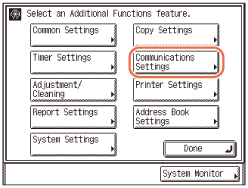
Press [Communications Settings].
3
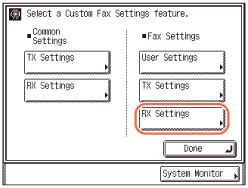
Press [RX Settings] under <Fax Settings>.
4
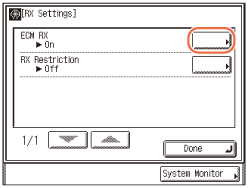
Press [ECM RX].
5
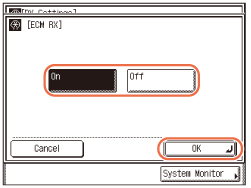
Select [On] or [Off] → press [OK].
|
|
[On]:
|
Uses ECM.
|
|
[Off]:
|
Does not use ECM.
|
6
Press (Reset) to return to the top screen.
(Reset) to return to the top screen.Rejecting Incoming Faxes from the Unidentified Senders
This function enables you to reject incoming faxes from senders who do not transmit their fax numbers (telephone numbers) to your machine. This can be useful when you do not want to receive direct mail (DM).
|
NOTE
|
|
The default setting is ‘Off’.
|
1
Press (Additional Functions) → [Communications Settings] → [RX Settings] under <Fax Settings>.
(Additional Functions) → [Communications Settings] → [RX Settings] under <Fax Settings>.For help, see steps 1 to 3 in Receiving with Error Correction Mode (ECM Reception).
2
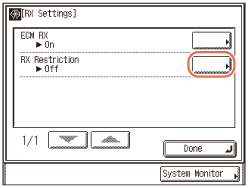
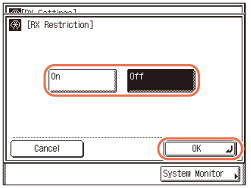
Press [RX Restriction].
3
Select [On] or [Off] → press [OK].
|
|
[On]:
|
Rejects to receive faxes from unknown senders.
|
|
[Off]:
|
Does not reject to receive faxes from unknown senders.
|
4
Press (Reset) to return to the top screen.
(Reset) to return to the top screen.