Storing/Editing/Deleting One-Touch Buttons
NOTE |
You cannot register new destinations in a group destination that is stored in a one-touch button. The destinations must be registered in the one-touch buttons beforehand. |
Storing/Editing One-Touch Buttons
1.
Press  (Main Menu) → [Fax] →
  (Register One-Touch Button).
(Main Menu) → [Fax] → (Register One-Touch Button).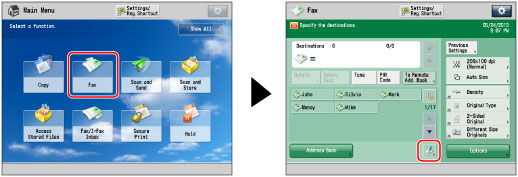
2.
Select a one-touch button to store or edit → press [Register/Edit].
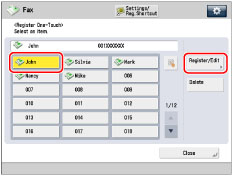
If you know the three digit number for the one-touch button, you can press  → enter the three digit number of the desired one-touch button using
  -
-  (numeric keys).
→ enter the three digit number of the desired one-touch button using - (numeric keys).If you select a one-touch button in which a destination is already stored, proceed to step 3.
NOTE |
The following icons are displayed to indicate the stored destination type for one-touch buttons in which a destination is already stored:  (Fax) (Fax) (Group) (Group) |
3.
Select the type of destination to register.
If you select [Fax]:
Press [Fax].
Enter a name for the address in [Name] in accordance with steps 5 and 6 of "Storing Fax Numbers."
Press [One-Touch Name].
Enter a name → press [OK].
Enter the fax number in accordance with step 8 and 9 of "Storing Fax Numbers."
If you select [Group]:
Press [Group].
Enter a name for the group destination in [Name] in accordance with steps 5 and 6 of "Storing Group Addresses."
Press [One-Touch Name].
Enter a name → press [OK].
Select a destination to store in the group address from [Add from One-Touch] → press [OK].
You can only select destinations that are already stored in one-touch buttons to be part of a one-touch button group address.
If you know the three digit number for the one-touch button, you can press → enter the three digit number of the desired one-touch button using - (numeric keys).
→ enter the three digit number of the desired one-touch button using - (numeric keys).If you select [Register from LDAP Server]:
Press [Register from LDAP Server].
Specify the address by using LDAP server in accordance with steps 4 to 9 of "Specifying Destinations Using the Address Book (LDAP Server)."
Select the destination from the search results → press [Next].
You cannot select multiple destinations at the same time.
NOTE |
To cancel a specified destination, select the destination you want to register again. |
If necessary, edit the contents of the destination.
Press [One-Touch Name].
Enter a name → press [OK].
IMPORTANT |
The information that you can obtain via the LDAP server consists of only names and fax numbers. |
Press [OK].
4.
Press [Close] → [OK].
Deleting One-Touch Buttons
1.
Press (Main Menu) → [Fax] → (Register One-Touch Button).
(Main Menu) → [Fax] → (Register One-Touch Button).2.
Select the one-touch button to delete → press [Delete].
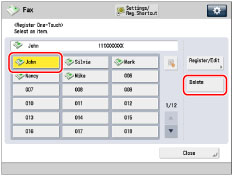
If you know the three digit number for the desired one-touch button, you can press → enter the three digit number of the desired one-touch button using - (numeric keys).
→ enter the three digit number of the desired one-touch button using - (numeric keys).NOTE |
The following icons are displayed to indicate the stored destination type for one-touch buttons in which a destination is already stored: (Fax) (Group) |
3.
Press [Yes].
4.
Press [Close].
IMPORTANT |
If you set [Switch Language/Keyboard On/Off] to 'On', the host name and folder path of the file server destination may not appear correctly, and you may not be able to browse them. (See "Enabling the Language/Keyboard Switch.") |
NOTE |
Destinations stored in one-touch buttons also appear in the Local Address Book. |