Register Unit Name
Register your name or company's name (sender's name).
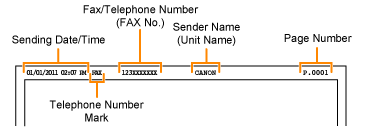
Once the information has been registered, it is printed at the top of each page that you are sending.
How to access the option:
[ ] (Menu) -> <Fax TX Settings> -> <Basic Settings> -> <Register Unit Name>
] (Menu) -> <Fax TX Settings> -> <Basic Settings> -> <Register Unit Name>How to register the sender's name:
Enter up to 24 alphanumeric characters.
|
NOTE
|
Where the sender's name appears on the page:The information is printed at the top of each page that you are sending.
 |