
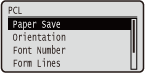
PCL
 |
All the settings about the PCL control commands are listed with short descriptions. Default settings are marked with a dagger (
 ). ). |
|
|
Asterisks (*)Settings marked with an asterisk (*) are not displayed depending on other settings or whether the optional ROM is installed on the machine.
|
|
|
Paper Save
Specifies whether the machine outputs the blank page that can be created due to no data existing between two form feed codes sent from an application.
|
Off
On
|
 (
( )
)  <PCL>
<PCL>  <Paper Save> <Off> or <On>
 Orientation
Enables you to set the paper orientation.
|
Portrait
Landscape
|
() <PCL> <Orientation> <Portrait> or <Landscape> Font Number
Enables you to set the default font for this machine function using the corresponding font numbers. Valid font numbers are from 0 to 104.
|
0
to 104 |
() <PCL> <Font Number> Use the numeric keys to enter the port number Point Size *
If the number selected in <Font Number> is that of a proportionally spaced scalable font, this option appears in the <PCL> options. It enables you to specify a point size for the default font. The point size can be adjusted in increments of 0.25 pts.
|
4.00 to 12.00
to 999.75 point |
() <PCL> <Point Size> Use the numeric keys to enter the setting value Pitch *
If the number selected in <Font Number> is that of a fixed pitch scalable font, <Pitch> appears in the <PCL> options. It enables you to specify the pitch for the default font. The pitch can be adjusted in increments of 0.01 cpi (characters per inch).
|
0.44 to 10.00
to 99.99 cpi |
() <PCL> <Pitch> Use the numeric keys to enter the setting value Form Lines
Enables you to specify the number of lines to be printed on a page. You can specify from 5 to 128 lines.
|
5 to 64
to 128 lines |
() <PCL> <Form Lines> Use the numeric keys to enter the setting value Character Code
Enables you to select the symbol set most suited to the needs of the host computer.
|
() <PCL> <Character Code> Select the character code Custom Size
Enables you to specify a custom paper size. If <Set> is selected, you can enter a custom size.
|
Do Not Set
Set
|
() <PCL> <Custom Size> <Set> or <Do Not Set> Unit of Measurement *
Enables you to specify the unit of measurement you would like to use to specify your custom paper size.
|
Millimeters
Inches
|
() <PCL> <Unit of Measurement> <Millimeters> or <Inches> X Dimension *
Enables you to specify the X dimension of the custom paper. The X dimension can be adjusted between 76.2 mm and 215.9 mm in increments of 0.1 mm.
|
76.2 to 215.9
mm |
() <PCL> <X Dimension> Use the numeric keys to enter the setting value Y Dimension *
Enables you to specify the Y dimension of the custom paper. The Y dimension can be adjusted between 127.0 mm and 355.6 mm in increments of 0.1 mm.
|
127.0 to 355.6
mm |
() <PCL> <Y Dimension> Use the numeric keys to enter the setting value Append CR to LF
Enables you to specify whether to append a carriage return (CR) when line feed code (LF) is received.
|
Yes
No
|
() <PCL> <Append CR to LF> <Yes> or <No> 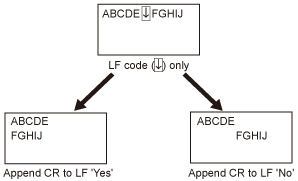
Enlarge A4 Prt Width
Determines whether to expand the printable area of A4 paper to that of Letter size in width.
|
Off
On
|
() <PCL> <Enlarge A4 Prt Width> <Off> or <On> BarDIMM *
You can enable or disable the Bar Code Printing function of the machine.
|
Enable
Disable |
() <PCL> <BarDIMM> <Enable> or <Disable> FreeScape *
You can specify the AEC (Alternate Escape Code) to be used for bar code commands when the host computer does not support the standard Escape Code.
|
Off
~ " # $ / \ ?
{ } | |
() <PCL> <FreeScape> Select Escape Code