Registering in the Address Book
 |
|
You can register frequently used fax/scan destinations in the Address Book and easily select them when needed. Destinations can be searched alphabetically, from lists in the Address Book, or by entering three-digit numbers (coded dial numbers). You can also specify destinations more quickly by using the following features.
|
Favorites
Registering a lot of addresses in the Address Book makes it difficult to find the destination you need. To avoid this situation, register frequently used destinations as Favorites. Destinations registered in Favorites can be searched from the < > in the Address Book. You can register up to 19 destinations as Favorites. Registering Destinations for Favorites
> in the Address Book. You can register up to 19 destinations as Favorites. Registering Destinations for FavoritesGroup Dial
You can select multiple destinations that have already been registered and register them together as a group. You can send faxes or e-mails to multiple destinations at the same time. You can register up to 299 destinations (100 destinations for e-mails) for a group. Groups can also be registered in Favorites. Registering Multiple Destinations for Group Dial
Index
The registered destinations are classified into indexes depending on the initial character or the type of address. Changing indexes allows you to perform a destination search quickly.
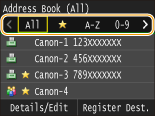
<All>
Displays all the destinations registered in the Address Book.
Displays all the destinations registered in the Address Book.
<>
Displays a list of destinations registered in Favorites.
>Displays a list of destinations registered in Favorites.
<A-Z>/<0-9>/<ABC> to <YZ>
Displays destinations with recipient names whose first characters correspond to the characters of the selected index.
Displays destinations with recipient names whose first characters correspond to the characters of the selected index.
< >
>
Displays destinations for faxes.
> Displays destinations for faxes.
< >
>
Displays destinations for e-mails.
>Displays destinations for e-mails.
< >
>
Displays destinations for I-Faxes.
>Displays destinations for I-Faxes.
< >
>
Displays destinations for shared folders and FTP servers. Registration of destinations is performed from the computer. Setting a Shared Folder as a Save Location Registering Destinations in the Address Book from Remote UI
>Displays destinations for shared folders and FTP servers. Registration of destinations is performed from the computer. Setting a Shared Folder as a Save Location Registering Destinations in the Address Book from Remote UI
< >
>
Displays a list of destinations registered in Group Dial.
>Displays a list of destinations registered in Group Dial.
 |
|
The Address Book allows for registration of up to 300 destinations including average and favorite ones.
Use the computer to register a shared folder or FTP server as the destination for scans.
Setting a Shared Folder as a Save Location Registering Destinations in the Address Book from Remote UI You can save the Address Book as a file on your computer (although you cannot use the computer to edit the Address Book). You can also import a saved Address Book from the computer to the machine. Saving/Loading Settings Data
You can print a list of destinations registered in the Address Book. Address Book List
If your office has an LDAP server installed, you can make search to find user information on the server and register it in the Address Book. You need to specify the settings for connecting to an LDAP server beforehand. Registering LDAP Servers
|