Memory Media Print Settings
 |
|
All the settings are about the memory media print listed with short descriptions. Default settings are marked with a dagger (
 ). ). |
 |
Asterisks (*)Settings marked with an asterisk (*) are only available when the optional paper feeder (drawer 2) is attached.
|
Change Default Settings
Specify the memory media print settings. The selected settings are used as the default settings of the memory media print function. Changing Default Memory Media Print Settings
|
Number of Copies
1
to 99Paper
Multi-Purpose Tray
Drawer 1
Drawer 2*
N on 1
Off
2 on 1
4 on 1
2-Sided
Off
Book Type
Calendar Type
Print Quality Density
17 Levels
Density (Fine Adjust)
High: 17 Levels
Medium: 17 Levels
Low: 17 Levels
Toner Save
Off
On
Set JPEG/TIFF Details
Print Date
Off
On
Print File Name
Off
On
Original Type
Photo Priority
Text Priority Brightness
Five Levels
Halftones
Gradation
Error Diffusion
Grayscale Conversion
sRGB
NTSC
Uniform RGB
Set PDF Details
Enlarge/Reduce to Fit Paper Size
Off
On
Enlarge Print Area
Off
On
Print Comments
Off
Auto
Other
Halftones
Text: Resolution
/Gradation/High ResolutionGraphics: Resolution
/Gradation/High ResolutionImage: Resolution
/Gradation/High ResolutionGrayscale Conversion
sRGB
NTSC
Uniform RGB
|
Default Display Settings
Select whether to display a list of file names or thumbnails for previewing when accessing files in a USB memory device.
|
Details
Images
|
<Menu>  <Memory Media Print Settings> <Default Display Settings> Select <Details> or <Images>
<Memory Media Print Settings> <Default Display Settings> Select <Details> or <Images> 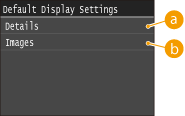
 <Details>
Displays file names and dates in list form.
 <Images>
Displays thumbnails for previewing.
File Sort Default Settings
Select whether to display files in a USB memory device in ascending or descending order of file name or date.
|
Name (Ascending)
Name (Descending)
Date/Time (Ascending)
Date/Time (Descending)
|
<Menu> <Memory Media Print Settings> <File Sort Default Settings> Select the order of files that are displayed
<Memory Media Print Settings> <File Sort Default Settings> Select the order of files that are displayed File Name Display Format
Select whether to display short or long text for file names that are stored in a USB memory device.
|
Short File Name
Long File Name |
<Menu> <Memory Media Print Settings> <File Name Display Format> Select <Short File Name> or <Long File Name>
<Memory Media Print Settings> <File Name Display Format> Select <Short File Name> or <Long File Name> 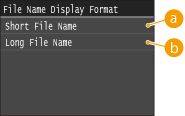
<Short File Name>
Shortens a file name to as few as eight characters. To distinguish files that have similar names, numbers such as "~1" or "~2" are added at the end of the file names.
<Long File Name>
Displays a file name up to 20 characters.
|
|
 The number of characters described above does not include the characters in file extensions, such as ".jpg."
|
Initialize Default Settings
Select to return the Memory Media Print Settings to the factory defaults.
<Menu> <Memory Media Print Settings> <Initialize Default Settings> <Yes>
<Memory Media Print Settings> <Initialize Default Settings> <Yes>