Restricting Use of the Address Book
 | You can prevent the leakage of sensitive or personal information from the Address Book by setting a PIN or preventing certain destinations from being displayed in the Address Book. You can also hide the Address Book itself. Administrator privileges are required in order to configure these settings. |
Setting a PIN for Address Book
The Address Book can be set to require users to enter a PIN in order to add new entries to the Address Book or edit existing entries. This can reduce the risk of unauthorized editing of the Address Book. Note, however, that even if a PIN is set for the Address Book, a user who logs in with Administrator privileges can add and edit entries without entering the required PIN.
1
Press  (Settings/Registration).
(Settings/Registration).2
Press <Set Destination>  <Address Book PIN> <Set>.
<Address Book PIN> <Set>.3
Set the PIN for editing the Address Book.
Enter the PIN and press <Confirm>. For confirmation, enter the PIN again and press <OK>.
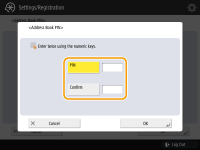

You cannot set a PIN that consists only of zeros, such as "00" or "0000000".
To disable the PIN, press  (Clear) to erase the PIN (leave the text box blank), and press <OK>.
(Clear) to erase the PIN (leave the text box blank), and press <OK>.4
Press <OK>.
|
In addition to setting the Address Book PIN, you can further enhance security by performing the following operations: Restricting the addition of new destinations Limiting Available Destinations Disabling the PC fax function Restricting Fax Sending from a Computer |
Restricting Access to Destinations Registered in the Address Book
You can set an access number for important business contacts and other destinations in the Address Book that you do not want to display to all users. Destinations with a registered access number are only displayed to users who enter the correct access number. Follow the procedure below to enable the access number registration function.
 |
If the access number registration function is enabled, users cannot specify a destination using <Previous Settings>. |
(Settings/Registration) <Set Destination> <Manage Address Book Access Numbers> <On> <OK>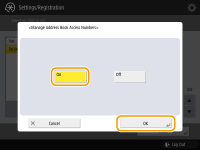
After configuring this setting, register the access numbers in the Address Book.
|
You can enter up to seven digits for the access number. If you enter fewer than seven digits, the machine stores the access number with leading zeros. Example: If <321> is entered, <0000321> is stored. You cannot store an access number with only zeros as the number, such as <0000000>. If you enter a number that begins in zeros, such as <02> or <002>, the zeros are ignored and the number is registered as <0000002>, the same as if you had simply entered <2>. |
Hiding the Address Book
Set whether to hide the Address Book and one-touch buttons. You can specify separate settings for Fax as well as Scan and Send.
Hiding the Fax Address Book and One-Touch Buttons
(Settings/Registration) <Function Settings> <Send> <Fax Settings> <Restrict Address Book Use> <On> <OK>Hiding the Scan and Send Address Book and One-Touch Buttons
(Settings/Registration) <Function Settings> <Send> <Common Settings> <Restrict Address Book Use> <On> <OK>