
 <Function Settings> <Receive/Forward> <Output Report> <Function Settings> <Receive/Forward> <Output Report> <Function Settings> <Receive/Forward> <Output Report> <Function Settings> <Receive/Forward> <Common Settings> <Function Settings> <Receive/Forward> <Common Settings> <Function Settings> <Receive/Forward> <Common Settings> <Function Settings> <Receive/Forward> <Common Settings> <Function Settings> <Receive/Forward> <Common Settings>
 <Function Settings> <Receive/Forward> <Common Settings>
 |
|
This setting is disabled when receiving faxes.
|
<Function Settings> <Receive/Forward> <Common Settings> <Function Settings> <Receive/Forward> <Common Settings> <Function Settings> <Receive/Forward> <Common Settings>|
|
|
If you press <Common Settings>
set <Delete Failed TX Jobs> to <Off>, the documents with forwarding errors will be saved on the <Status Monitor/Cancel> screen, and the documents will not be processed according to the settings you specified here. |
<Function Settings> <Receive/Forward> <Common Settings> <Function Settings> <Receive/Forward> <Common Settings> <Set Fax/I-Fax Inbox> Setting/Registering Confidential Fax Inboxes
|
1
|
Press
. |
||
|
2
|
Press <Function Settings>
<Receive/Forward> <Common Settings>. |
||
|
3
|
Press <Set Fax/I-Fax Inbox>.
|
||
|
4
|
Press <Set/Register Confidential Fax Inboxes>.
|
||
|
5
|
Select the box number
specify each setting, and press <OK>.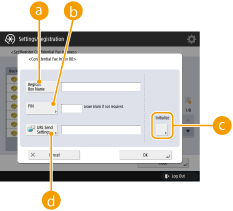  <Register Box Name> <Register Box Name>Register a name for the box.
 <PIN> <PIN>Enter the PIN for the box.
 <Initialize> <Initialize>Initializes the box.
 <URL Send Settings> <URL Send Settings>Enables the URL for a box with documents saved can be sent via e-mail or checked on the Remote UI screen.
|
<Function Settings> <Receive/Forward> <Common Settings> <Set Fax/I-Fax Inbox>
 |
|
Since there is no way to check a registered PIN, make sure that you write down the PIN that you enter, and keep it in a safe place.
|
<Function Settings> <Receive/Forward> <Common Settings> <Set Fax/I-Fax Inbox> <Function Settings> <Receive/Forward> <Common Settings> <Set Fax/I-Fax Inbox> <Function Settings> <Receive/Forward> <Common Settings> <Set Fax/I-Fax Inbox> Setting the Start Time for Memory Reception|
1
|
Press
. |
||
|
2
|
Press <Function Settings>
<Receive/Forward> <Common Settings>. |
||
|
3
|
Press <Set Fax/I-Fax Inbox>.
|
||
|
4
|
Press <Memory Lock Start Time>, and specify the required settings.
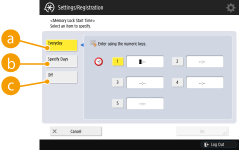 <Everyday> <Everyday>Set the time that memory reception starts.
<Specify Days>Set the day of the week and time that memory reception starts.
<Off>Select this when you do not want to set a memory reception start time.
|
<Function Settings> <Receive/Forward> <Common Settings> <Set Fax/I-Fax Inbox> Setting the End Time for Memory Reception|
1
|
Press
. |
||
|
2
|
Press <Function Settings>
<Receive/Forward> <Common Settings>. |
||
|
3
|
Press <Set Fax/I-Fax Inbox>.
|
||
|
4
|
Press <Memory Lock End Time>, and specify the required settings.
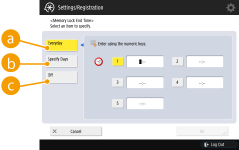 <Everyday> <Everyday>Set the time that memory reception ends.
<Specify Days>Set the day of the week and time that memory reception ends.
<Off>Select this when you do not want to set a memory reception end time.
|
<Function Settings> <Receive/Forward> <Common Settings> <Set Fax/I-Fax Inbox> |
|
|
If you delete divided data, it cannot be combined to form a complete document, even if the remaining divided data is received later.
Divided data cannot be printed as a regular image unless it has been combined.
|
<Function Settings> <Receive/Forward> <Common Settings> <Set Fax/I-Fax Inbox> <Function Settings> <Receive/Forward> <Common Settings> <Function Settings> <Receive/Forward> <Fax Settings>|
|
|
To perform a communication using ECM, ECM needs to be set in both the sending machine and this machine.
Even when you set ECM, errors can sometimes occur due to a poor telephone line connection.
|
<Function Settings> <Receive/Forward> <Fax Settings> <Function Settings> <Receive/Forward> <Fax Settings> <Function Settings> <Receive/Forward> <Fax Settings> <Function Settings> <Receive/Forward> <Fax Settings>|
|
|
Priority is given to the subaddress password if the received document is set with a subaddress, even if an RX password is set.
|
|
|
|
ITU-T stands for International Telecommunication Union-Telecommunication Standardization Sector, which is the group that makes recommendations toward the standardization of worldwide telecommunications.
|