Timer Settings
 |
|
All the settings about the timer are listed with short descriptions. Default settings are marked with a dagger (
 ). ). |
|
NOTE
|
Asterisks (*)Settings marked with "*1" are only available for the MF244dw / MF232w.
Settings marked with "*2" may be unavailable or have different defaults depending on the country or region of purchase.
|
Quiet Mode Time *1
You can reduce the operation sound of the machine when you want it to run more quietly (quiet mode). Set a time for the machine to enter quiet mode automatically. You can also set the machine to always run in quiet mode. Entering Quiet Mode
|
Start Time
Off
On
Start time setting to enter quiet mode
End Time
Off
On
Stop time setting to exit quiet mode
|
Date/Time Settings *1
Specify date and time settings, including the date format and the 12- or 24-hour clock display setting.
Date Format 
Select the date format (order of year, month, and day).
|
YYYY MM/DD
MM/DD/YYYY
DD/MM YYYY
|

 <Timer Settings>
  <Date/Time Settings> <Date Format> Select the date format
 Time Format
Select the 12- or 24-hour clock display setting.
|
12 Hour (AM/PM)
24 Hour
|
<Timer Settings> <Date/Time Settings> <Time Format> Select the display setting Current Date/Time Settings
Set the current date and time. Use  /
/ to move the cursor, and
  /
/ to specify the date and time or switch between <AM>/<PM>.
/ to move the cursor, and / to specify the date and time or switch between <AM>/<PM>.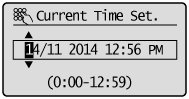 <Timer Settings> <Date/Time Settings> <Current Date/Time Settings> Set the date and time
 |
|
The current date and time cannot be changed for 1 hour after daylight saving time is in effect.
|
Time Zone
Select the time zone. If the time zone setting is changed, the values set in <Current Date/Time Settings> are also changed accordingly.
(UTC-12:00) International Date Line West
to
(UTC) Coordinated Universal Time
to
(UTC+14:00) Kiritimati Island
to
(UTC) Coordinated Universal Time
to
(UTC+14:00) Kiritimati Island
|
|
UTCCoordinated Universal Time (UTC) is the primary time standard by which the world regulates clocks and time. The correct UTC time zone setting is required for Internet communications.
|
<Timer Settings> <Date/Time Settings> <Time Zone> Select a time zone Daylight Saving Time Settings *2
Enable or disable daylight saving time. If daylight saving time is enabled, specify the dates from which and to which daylight saving time is in effect.
|
Off
On
Start: Month, Day
End: Month, Day
|
<Timer Settings> <Date/Time Settings> <Daylight Saving Time Settings>  <On> Select a starting month and day <Apply> Select an ending month and day <Apply>
 Auto Sleep Time
If the machine has not been operated or has had no data to process for a specified period of time, the machine enters sleep mode to save energy consumption (Auto Sleep). Specify the period of time after which auto sleep is performed. Auto Sleep is not performed when the setting menu is displayed. We recommend using the factory default settings to save the most power. Entering Sleep Mode
|
1
to 30 (min.) |
Auto Reset Time
If a key is not pressed for a specified period of time, the screen and the settings are initialized to display the default screen (Auto Reset). Specify the interval at which the Auto Reset is performed. Select <0> to disable the Auto Reset function. The Auto Reset is not performed in the following cases:
The setting menu is displayed.
The machine is processing data, such as when printing documents.
An error message is displayed and the error indicator is blinking (However, Auto Reset is performed when the error does not prevent the user from continuing to use a function.)
|
0 (Auto Reset is disabled.)
1 to 2
to 9 (min.) |
<Timer Settings> <Auto Reset Time> Set the Auto Reset time |
|
|
The screen displayed after the Auto Reset is performed can be selected in <Function After Auto Reset>.
|
Function After Auto Reset
Select whether to return the display to the default screen after the Auto Reset is performed. If <Default Function> is selected, the display returns to the main screen for copy mode. If <Selected Function> is selected, the display returns to the main screen of the function that was selected.
|
Default Function
Selected Function
|
<Timer Settings> <Function After Auto Reset> Select <Default Function> or <Selected Function> Auto Offline Time
If a key has not been pressed for a specified period of time after the screen below is displayed (the machine is set online for scanning), the machine automatically becomes offline. Specify the time period at which the machine becomes offline. You can also set the machine to remain online.
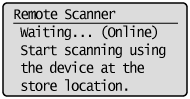
|
0 (The machine remains online.)
1 to 5
to 60 (min.) |
<Timer Settings> <Auto Offline Time> Set the time period