 to 9999
Layout
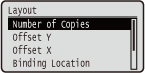 |
The settings about print appearance including gutter margins and print positions are listed with short descriptions. Default settings are marked with a dagger (
). |
Number of Copies
Specify the number of copies.
|
1
to 9999 |
 (
( )
)  <Layout>
  <Number of Copies> Use the numeric keys to enter the number of copies
 Offset Y/Offset X
You can specify settings for shifting the print position for all types of printing in 0.01" (0.5 mm) increments regardless of the paper source.
|
-1.97 to 0.00
to +1.97 (Inches) or -50.0 to 0.0 to +50.0 (mm) |
() <Layout> <Offset Y> or <Offset X> Use  /
/ to enter the offset value
 <Offset Y>
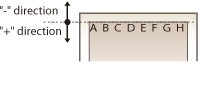
Shifts the print position vertically.
 <Offset X>
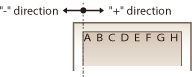
Shifts the print position horizontally.
 Offset values
For <Offset Y>, set a plus (+) value to shift the print position downward. For <Offset X>, set a plus (+) value to shift the print position rightward. Set a minus (-) value to shift the print position in the opposite direction.
|
|
<Offset Y>
 |
|
<Offset X>
 |
|
Specifying fine settings for the print position
|
|
You can select <Adj. Print Position> under <User Maintenance> to finely specify the print position for each paper source. The range of available offset values is from -0.20" to +0.20" (-5.0 to +5.0 mm). Adjusting Print Position
|
Binding Location
Select whether to bind the long edge or short edge of the printouts with a binding tool such as a stapler. In this case, specify settings for <Gutter> to adjust the binding margin, as well.
|
Long Edge
Short Edge
|
() <Layout> <Binding Location> <Long Edge> or <Short Edge> 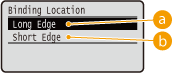
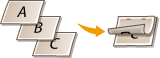
<Long Edge>
Select to bind the printouts along the long edge.
|
|
   |
|
<Short Edge>
Select to bind the printouts along the short edge.
|
|
  |
|
Gutter
Adjust the margin width of the edge specified in <Binding Location> by shifting the print position of the print data. If you select "0.00" or "0.0", the margin will not be changed.
|
-1.97 to 0.00
to +1.97 (Inches) or -50.0 to 0.0 to +50.0 (mm) |
() <Layout> <Gutter> Use / to enter the offset value 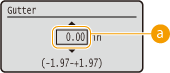
Margin values
Specify the direction and width for shifting the print position of the print data. The edge where the margin is changed varies depending on whether a "+" or "-" value is set. You can adjust the margin width in 0.01" (0.5 mm) increments.
 Portrait-oriented document
|
Setting Value
|
Long edge binding
|
Short edge binding
|
|
"+" value
|
Left end of paper
(for left binding)  |
Upper end of paper
(for top binding)  |
|
"-" value
|
Right end of paper
(for right binding)  |
Lower end of paper
(for bottom binding)  |
Landscape-oriented document|
Setting Value
|
Long edge binding
|
Short edge binding
|
|
"+" value
|
Left end of paper
(for top binding)  |
Upper end of paper
(for right binding)  |
|
"-" value
|
Right end of paper
(for bottom binding)  |
Upper end of paper
(for right binding)  |
Alternative Method
When you perform 2-sided printing of a document that consists of an odd number of pages, you can select whether to process the last page in 1-sided printing mode. If you select <On>, the printing will be finished faster than the regular 2-sided printing.
|
Off
On
|
() <Layout> <Alternative Method> <Off> or <On>
 |
When the printing of a document consisting of an even number of pages finishes in 1-sided printing modeIn the following cases, the last page is processed in 1-sided printing mode even if the document consists of an even number of pages.
The last page is blank.
The last page cannot be printed for a reason such as the paper size is not available for 2-sided printing.
When paper with preprinted logo is usedIf the last page is processed in 1-sided printing mode with <Alternative Method> to <On>, the orientation or print side of the last page may not match those of other pages. In this case, set <Alternative Method> to <Off>.
|