
Print Quality
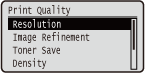 |
The settings about print quality including the resolution and toner density are listed with short descriptions. Default settings are marked with a dagger (
 ). ). |
|
|
Asterisks (*)Settings marked with an asterisk (*) are not displayed depending on other settings.
|
Resolution
Specify the resolution for processing print data.
|
600 dpi
1200 dpi
|
 (
( )
)  <Print Quality>
  <Resolution> <600 dpi> or <1200 dpi>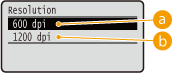
 <600 dpi>
This print mode is suitable for printing at a high speed.
 <1200 dpi>
Edges of characters and graphics can be clearly reproduced at high resolution. This print mode is suitable for printing data that contains many small characters.
Image Refinement *
Enable or disable the smoothing mode in which the edges of characters and graphics are smoothly printed. <Image Refinement> is not displayed when <Resolution> is set to <1200 dpi>.
|
Off
On
|
() <Print Quality> <Image Refinement> <Off> or <On> Toner Save
Specify this setting when you want to check the finishing such as the layout before printing a large job, for example. Since this printing mode saves toner, fine lines and portions with lighter print density may become blurred.
|
Off
On
|
() <Print Quality> <Toner Save> <Off> or <On> Density *
Adjust the toner density to apply to printing. <Density> is not displayed when <Toner Save> is set to <On>. Adjusting Print Density
|
-8 to 0
to +8 |
Density (Fine Adj) *
You can make fine adjustment of the toner density applied to printing separately for three different density areas. <Density (Fine Adj)> is not displayed when <Toner Save> is set to <On>. Adjusting Print Density
|
-8 to 0
to +8 |
Halftones
You can select the printing method to reproduce halftones (the intermediate range between the lighter and darker areas of an image). Halftones can be specified for each image data type in a single document.
|
Text
Resolution
Gradation
Color Tone
High Resolution
Graphics
Resolution
Gradation
Color Tone
High Resolution
Image
Resolution
Gradation
Color Tone
High Resolution
|
() <Print Quality> <Halftones> Select the image data type Select the method to reproduce halftones 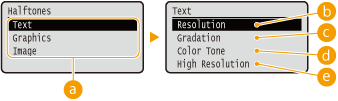
Image data type
Select the image data type for which the settings are changed. Select <Text> for characters, <Graphics> for lines and figures, or <Image> for images such as photos.
<Resolution>
Performs fine printing by sharply reproducing the edges of characters. This print mode is suitable for printing data of characters and thin lines with a clear finish.
 <Gradation>
Prints gradation and lines with a smooth finish. This print mode is suitable for printing figures and charts with gradation.
 <Color Tone>
Prints vivid images with a tonal contrast effect. This print mode is suitable for printing image data such as photos.
 <High Resolution>
Implements higher definition printing than the <Resolution> setting, but is slightly inferior in stability of texture. This print mode is suitable for sharply printing edges of data such as characters, thin lines, and CAD data.
Reduce Quality
Select whether to continue printing by automatically reducing the quality when insufficient memory is available for the processing.
|
Continue Printing
Stop Printing
|
() <Print Quality> <Reduce Quality> <Continue Printing> or <Stop Printing> |
|
|
If you select <Stop Printing>, an error message is displayed and the printing is stopped when the machine runs out of memory. You can press
 ( ( ) to resume the printing by reducing the quality. ) to resume the printing by reducing the quality. |
Adj. Prt. Line Width
Adjust this if the printed text or thin lines are faded.
|
-7 to 0
to +8 |
() <Print Quality> <Adj. Prt. Line Width> Use  /
/ for print line width adjustment.