
PCL
 |
All the settings about the PCL control commands are listed with short descriptions. Default settings are marked with a dagger (
 ). ). |
|
|
Asterisks (*)Settings marked with an asterisk (*) are not displayed depending on other settings or whether the optional ROM is installed on the machine.
|
|
|
Paper Save
Specifies whether the machine outputs the blank page that can be created due to no data existing between two form feed codes sent from an application.
|
Off
On
|
 (
( )
)  <PCL>
<PCL>  <Paper Save> <Off> or <On>
 Orientation
Enables you to set the paper orientation.
|
Portrait
Landscape
|
() <PCL> <Orientation> <Portrait> or <Landscape> Font Number
Enables you to set the default font for this machine function using the corresponding font numbers. Valid font numbers are from 0 to 104.
|
0
to 104 |
() <PCL> <Font Number> Use the numeric keys to enter the port number Point Size *
If the number selected in <Font Number> is that of a proportionally spaced scalable font, this option appears in the <PCL> options. It enables you to specify a point size for the default font. The point size can be adjusted in increments of 0.25 pts.
|
4.00 to 12.00
to 999.75 point |
() <PCL> <Point Size> Use the numeric keys to enter the setting value Pitch *
If the number selected in <Font Number> is that of a fixed pitch scalable font, <Pitch> appears in the <PCL> options. It enables you to specify the pitch for the default font. The pitch can be adjusted in increments of 0.01 cpi (characters per inch).
|
0.44 to 10.00
to 99.99 cpi |
() <PCL> <Pitch> Use the numeric keys to enter the setting value Form Lines
Enables you to specify the number of lines to be printed on a page. You can specify from 5 to 128 lines.
|
5 to 60
to 128 lines |
() <PCL> <Form Lines> Use the numeric keys to enter the setting value Character Code
Enables you to select the symbol set most suited to the needs of the host computer.
|
PC8
ROMAN8
ROMAN9
ISOL1
ISOL2
ISOL5
ISOL6
ISOL9
PC775
PC8DN
PC850
PC852
PC858
PC8TK
PC1004
WINL1
WINL2
WINL5
WINBALT
DESKTOP
PSTEXT
LEGAL
ISO4
ISO6
ISO11
ISO15
ISO17
ISO21
ISO60
ISO69
WIN 30
MCTEXT
PC864
ARABIC8
WINARB
PC866
ISOCYR
WINCYR
PC851
GREEK8
ISOGRK
PC8GRK
WINGRK
PC862
HEBREW7
HEBREW8
ISOHEB
|
() <PCL> <Character Code> Select the character code Custom Size
Enables you to specify a custom paper size. If <Set> is selected, you can enter a custom size.
|
Do Not Set
Set
|
() <PCL> <Custom Size> <Do Not Set> or <Set> Unit of Measurement *
Enables you to specify the unit of measurement you would like to use to specify your custom paper size.
|
Millimeters
Inches
|
() <PCL> <Unit of Measurement> <Millimeters> or <Inches> X Dimension *
Enables you to specify the X dimension of the custom paper. The X dimension can be adjusted between 3.00 in. (76.2 mm) and 8.50 in. (215.9 mm) in increments of 0.01 in. (0.1 mm).
|
3.00 to 8.50
in. (76.2 to 215.9 mm) |
() <PCL> <X Dimension> Use the numeric keys to enter the setting value Y Dimension *
Enables you to specify the Y dimension of the custom paper. The Y dimension can be adjusted between 5.00 in. (127.0 mm) and 14.00 in. (355.6 mm) in increments of 0.01 in. (0.1 mm).
|
5.00 to 14.00
in. (127.0 to 355.6 mm) |
() <PCL> <Y Dimension> Use the numeric keys to enter the setting value Append CR to LF
Enables you to specify whether to append a carriage return (CR) when line feed code (LF) is received.
|
Yes
No
|
() <PCL> <Append CR to LF> <Yes> or <No> 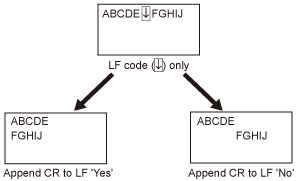
Enlarge A4 Prt Width
Determines whether to expand the printable area of A4 paper to that of Letter size in width.
|
Off
On
|
() <PCL> <Enlarge A4 Prt Width> <Off> or <On> BarDIMM *
You can enable or disable the Bar Code Printing function of the machine.
|
Enable
Disable |
() <PCL> <BarDIMM> <Enable> or <Disable> FreeScape *
You can specify the AEC (Alternate Escape Code) to be used for bar code commands when the host computer does not support the standard Escape Code.
|
Off
~ " # $ / \ ?
{ } | |
() <PCL> <FreeScape> Select Escape Code