Verifying the Authentication Status of a License
The license authentication status can be checked in the License Information Management application.
|
NOTE
|
|
If you uninstall Desktop, the License Information Management application is also uninstalled. You can start the License Information Management application from the Desktop Installation Media to check the license authentication status. For more information, see the following.
|
1.
Select the [Start] menu > [All Programs] > [Canon iW] > [iW Desktop] > [iW Desktop License Information Management].
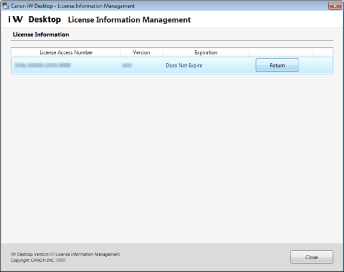
The [License Information Management] dialog box is displayed.
|
NOTE
|
|
For Windows 8.1, click
 > [iW Desktop License Information Management] on the [Start] screen. > [iW Desktop License Information Management] on the [Start] screen.For Windows 10, select the [Start] menu > [All apps] > [Canon iW] > [iW Desktop License Information Management].
|
|
[License Access Number]
|
Displays the License Access Number.
|
|
[Version]
|
Displays the version of the license.
|
|
[Expiration]
|
Displays the period that the license is valid for.
|
|
[Return]
|
Click [Return] to return the license.
For more information on "Return License," see the following.
|