Offline Return
If the computer to return the Desktop license from (transfer source) is not connected to the Internet, return the license via your Canon dealer.
Create a Request Data File
|
NOTE
|
|
Make sure to completely exit Desktop before performing this operation. Exit Desktop Browser, Desktop Editor, Printer Monitor, and Document Monitor.
|
1.
Select the [Start] menu > [All Programs] > [Canon iW] > [iW Desktop] > [iW Desktop License Information Management].
|
NOTE
|
|
For Windows 8.1, click
 > [iW Desktop License Information Management] on the [Start] screen. > [iW Desktop License Information Management] on the [Start] screen.For Windows 10, select the [Start] menu > [All apps] > [Canon iW] > [iW Desktop License Information Management].
|
2.
Click [Return].

3.
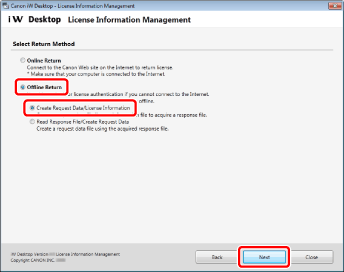
Select [Create Request Data/License Information] for [Offline Return], and click [Next].
4.
Click [Create].
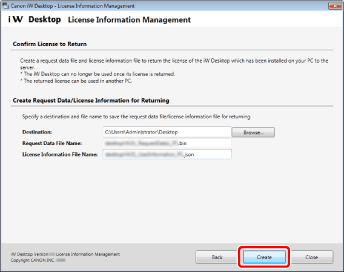
The Request Data File and User Information Files (two types, *.bin and *.json) are saved.
|
NOTE
|
|
You can also select a folder in the [Browse For Folder] dialog box that is displayed when [Browse] is clicked. Alternatively, in the [Browse For Folder] dialog box, you can create a new folder and select it.
You can change the file name. However, the following symbols cannot be entered: \ / : * ? " < > | ; . & % '
|
5.
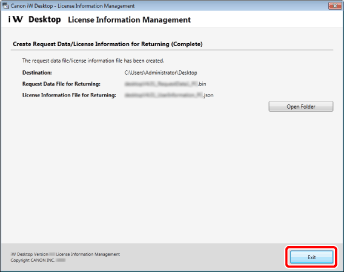
Click [Exit].
|
NOTE
|
|
You can click [Open Folder] to open the destination folder.
|
Requesting a Response File for returning to Be Issued
1.
Contact your Canon dealer and check the methods for sending the Request Data File and User Information Files (two types, *.bin and *.json).
2.
Follow the directions to send the Request Data File and User Information Files (two types, *.bin and *.json) to your Canon dealer.
3.
Acquire the issued Response File for returning (*.json) from your Canon dealer.
Create a Request Data File for Returning (bin)
|
NOTE
|
|
Make sure to completely exit Desktop before performing this operation. Exit Desktop Browser, Desktop Editor, Printer Monitor, and Document Monitor.
|
1.
Select the [Start] menu > [All Programs] > [Canon iW] > [iW Desktop] > [iW Desktop License Information Management].
|
NOTE
|
|
For Windows 8.1, click
> [iW Desktop License Information Management] on the [Start] screen.For Windows 10, select the [Start] menu > [All apps] > [Canon iW] > [iW Desktop License Information Management].
|
2.
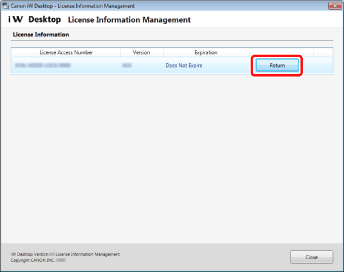
Click [Return].
3.
Select [Read Response File/Create Request Data] for [Offline Return], and click [Next].
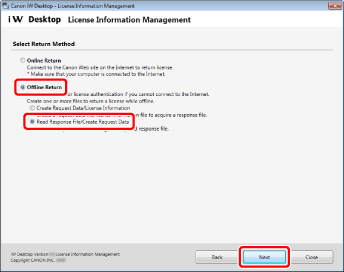
4.
Select the Response File for returning (*.json) issued by your Canon dealer in [Browse], and click [Next].
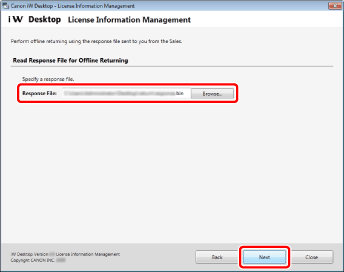
5.
Click [Create].
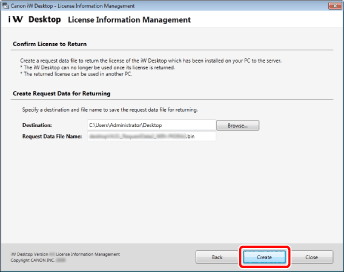
The Request Data File for returning (*.bin) is saved.
|
NOTE
|
|
You can also select a folder in the [Browse For Folder] dialog box that is displayed when [Browse] is clicked. Alternatively, in the [Browse For Folder] dialog box, you can create a new folder and select it.
You can change the file name. However, the following symbols cannot be entered: \ / : * ? " < > | ; . & % '
|
Request for a License to Be Returned
1.
Contact your Canon dealer and check the method for sending the Request Data File for returning (*.bin).
2.
Follow the directions to send the Request Data File for returning (*.bin) to your Canon dealer.
|
NOTE
|
|
Send the Request Data File for returning (*.bin) to your Canon dealer. The procedure for returning the license is complete when the returned license is processed.
|
Re-authenticate the License
Use the same License Access Number as the license you returned to re-authenticate the license on the computer where you want to use Desktop (transfer destination).
For details on how to authenticate a license, refer to the following.