在任务栏上显示图标
Windows 7/Windows 8.1/Windows 10的默认设置限制图标显示在任务栏通知区域。按照以下步骤在任务栏通知区域显示图标。
对于 Windows 7/Windows 8.1
1.
选择 [开始] 菜单 > [控制面板]。
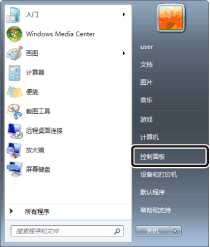
显示[控制面板]。
|
注释
|
|
对于Windows 8.1,在超级按钮中选择[设置] > [控制面板]。
|
2.
选择 [查看方式]中的 [小图标]。
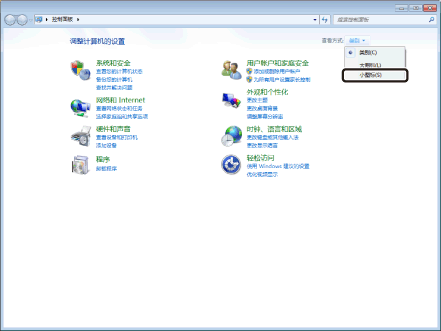
所有控制面板项目都将显示在 [控制面板] 中。
3.
选择 [通知区域图标]。
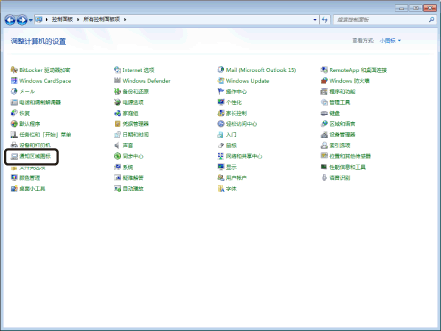
将显示 [通知区域图标] 窗口。
4.
选中 [始终在任务栏上显示所有图标和通知] 复选框并单击 [确定]。
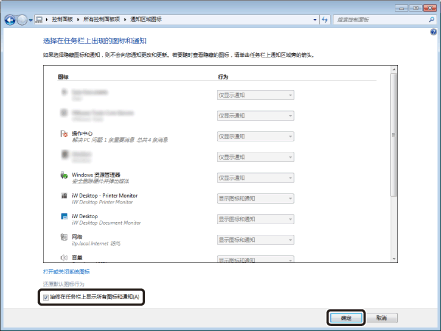
将关闭 [通知区域图标] 窗口。
|
注释
|
|
如果只想更改Printer Monitor和Document Monitor的图标显示设置,将下列图标设置更改为[显示图标和通知]。
iW Desktop - Printer Monitor
iW Desktop
|
5.
关闭 [控制面板]。
对于Windows 10
1.
选择 [开始] 菜单 > [设置]。
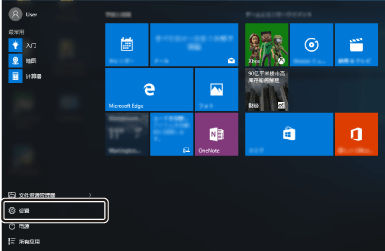
将显示 [设置] 屏幕。
2.
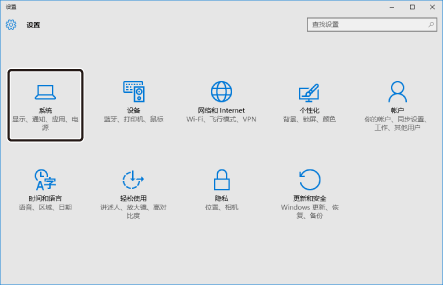
选择 [系统]。
3.
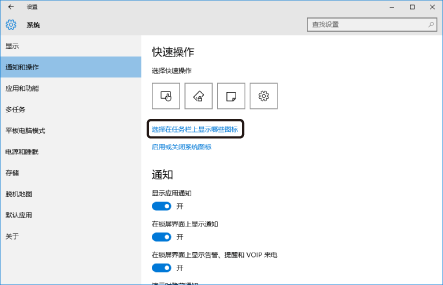
选择[通知和操作]菜单中的[选择在任务栏上显示哪些图标]。
4.
对于[通知区域始终显示所有图标],单击[关]。
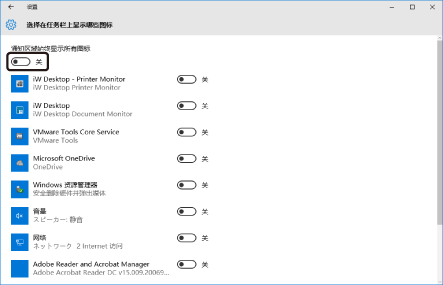
[通知区域始终显示所有图标]设置为[开]。
5.
关闭 [设置] 屏幕。
|
注释
|
|
即使将以下图标设置从[关]更改为[开],Printer Monitor和Document Monitor图标也可以显示在任务栏的通知区域。
iW Desktop - Printer Monitor
iW Desktop
|