Forwarding All the Received Documents Automatically
The machine can forward all the received documents to specified destinations. Even if you are out of the office, you can receive fax information anytime, anywhere.
Specifying Settings for Documents to be Forwarded Automatically
While the Forwarding function is activated, all the documents to be received are automatically forwarded.

 <System Management Settings>
  <Forwarding Settings> <On> Select the forwarding destination from the Address Book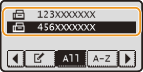
|
NOTE
|
|
For instructions on how to use the Address Book, see Specifying from Address Book (Fax).
|
Printing Documents to be Forwarded
If you want to check the documents to be forwarded for yourself, you can set the machine to print the documents whenever they are forwarded, or to print only the documents that failed to be forwarded.
<System Management Settings> <Store/Print When Forwarding> <Print Images> Select <On> or <Only When Error Occurs> 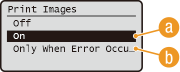
 <On>
<On>
Prints all the documents to be forwarded.
 <Only When Error Occurs>
Prints only the documents that failed to be forwarded.
Printing/Resending/Deleting Documents that Failed to be Forwarded
You can store documents that failed to be forwarded in memory and print, resend, or delete them later.
Storing Documents that Failed to be Forwarded in Memory
<System Management Settings> <Store/Print When Forwarding> <Store Images in Memory> <Only When Error Occurs> 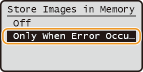
Printing/Resending/Deleting Documents Stored in Memory
1
Press  (Status Monitor).
(Status Monitor).2
Use  /
/ to select <Fax Forwarding Errors>, and press .
/ to select <Fax Forwarding Errors>, and press .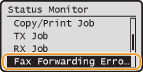
3
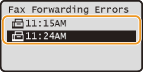
Select the document you want to check, and press .
.
 To print the checked document
|
1
|
Select <Print>, and press
.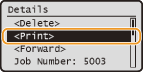 |
|
2
|
Select <Yes>, and press
.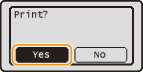 |
To resend the checked document
|
1
|
Select <Forward>, and press
.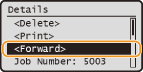 |
|
2
|
Select the forwarding destination from the Address Book, and press
.For instructions on how to use the Address Book, see Specifying from Address Book (Fax).
|
To delete the checked document
|
1
|
Select <Delete>, and press
.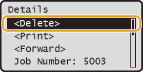 |
|
2
|
Select <Yes>, and press
.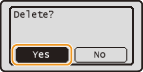 |