Booklet Printing
You can bind printed documents into a booklet by printing 2 pages of a document onto each side of the paper, such that they can be folded in half to create a booklet (4 pages of a document are printed onto one sheet of paper).
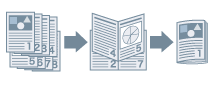
1.
Display the [Print Settings] tab.
2.
Select [Print Style] → [Booklet Printing]
3.
Select [Binding Location] → click [OK].
About this Function
Functions that Cannot Be Used with this Function
Settings other than [Print Settings] tab →[Page Layout] → [1 on 1]
[Print Settings] tab → [Finishing] → [Collate]
[Print Settings] tab → [Finishing] → [Group]