Pripojenie telefónnej linky
1660-01S
K zariadeniu pripojte telefónnu linku.
1
K zariadeniu pripojte telefónnu linku.
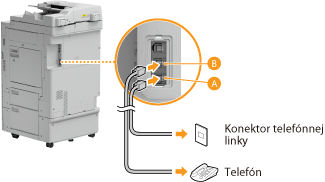
Pripojte telefonický kábel ku konektoru telefónnej linky na zariadení ( ) a ku konektoru telefónnej linky v stene.
) a ku konektoru telefónnej linky v stene. Ak používate telefón alebo záznamník, pripojte ho k externému konektoru telefónu ( ).
).
).

Ak pripájate externý telefón s faxovými funkciami, nastavte telefón tak, aby sa faxy prijímali manuálne.
2
Po pripojení telefónnej linky vyberte položku <Koniec>.
3
Vyberte <Áno>.
Ak zariadenie nenastaví typ telefónnej linky automaticky
Postupujte podľa nižšie opísaného postupu na nastavenie typu telefónnej linky. Ak si nie ste istí typom telefónnej linky, ktorú používate, kontaktujte miestnu telefonickú spoločnosť. V závislosti od krajiny, kde zariadenie používate, nemusí byť nastavenie <Vybrať typ linky> dostupné.
<Ponuka>  <Nastavenia funkcií> <Odoslať> <Nastavenia faxu>
  <Nastaviť linku> <Vybrať typ linky> Vyberte typ telefónnej linky
<Nastavenia funkcií> <Odoslať> <Nastavenia faxu> <Nastaviť linku> <Vybrať typ linky> Vyberte typ telefónnej linky