
Importing/Exporting the Setting Data
|
Machine settings data can be saved on your computer (export). Data that is saved on your computer can also be registered in the machine (import). Data exported from this machine can be imported to another machine of the same model. So you can easily copy a variety of settings data to multiple machines. To use these features, it is required that you have logged in to System Manager Mode.
|
|
|
Do not turn OFF the machine until the import or export process is completeIt may take a few minutes to complete the process. If the machine is turned OFF during the process, it may result in damage to data or the machine.
Do not operate the machine during the import or export processBefore importing/exporting, check that no operation such as printing documents is currently proceeding.
|
 |
|
For the settings that cannot be imported/exported, see Setting Menu List.
You can also import/export settings data via a USB memory device by using the operation panel of the machine. <Import/Export>
For more information about the basic operations to be performed when setting the machine from the Remote UI, see Setting Up Menu Options from Remote UI.
|
Exporting the Setting Data
You can export machine settings data, and save them on a computer. It is recommended that you regularly back up important settings.
1
Start the Remote UI and log in to System Manager Mode. Starting Remote UI
2
Click [Settings/Registration] on the Portal page. Remote UI Screen
3
Select [Data Management]  [Export].
[Export].4
Specify the encryption password.
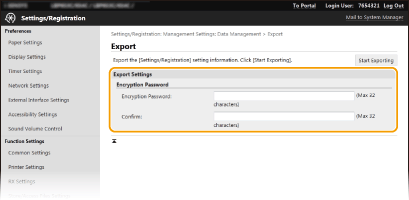
[Encryption Password]
Enter a password to encrypt the export data using alphanumeric characters. Enter the same password in [Confirm]. To export the data, you must set an encryption password.
Enter a password to encrypt the export data using alphanumeric characters. Enter the same password in [Confirm]. To export the data, you must set an encryption password.

The password is required when exported data is imported. Importing the Setting Data
5
Click [Start Exporting].
6
Follow the on-screen instructions to specify the location where to save the exported data.
The setting data will be saved.
Importing the Setting Data
Load (import) data that was exported from the machine. You can also import machine settings data from another machine to your machine if the models are the same.
1
Start the Remote UI and log in to System Manager Mode. Starting Remote UI
2
Click [Settings/Registration] on the Portal page. Remote UI Screen
3
Select [Data Management] [Import].
[Import].4
Specify the file to import, and enter the password.
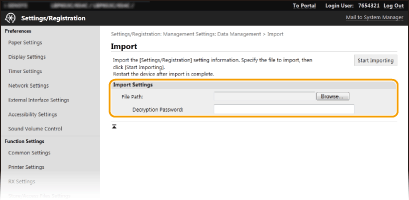
[File Path]
Click [Browse] and select the file. You can only import a device configuration information file (*.dcm).
Click [Browse] and select the file. You can only import a device configuration information file (*.dcm).
[Decryption Password]
Enter the password set when the settings were exported.
Enter the password set when the settings were exported.
5
Click [Start Importing].
6
Click [OK].
The selected settings data is loaded into the machine.
7
Click [OK].
If the [Settings/Registration] check box is selected in step 4, the machine automatically restarts.