
<System Management Settings>
All the settings related to System Management Settings are listed with descriptions. Default settings are marked with a dagger ( ).
).
).|
|
Asterisks (*)Settings marked with "*1" may be unavailable or vary or have different defaults depending on your country or region.
Settings marked with "*2" may not be displayed depending on the model you are using or other setting items.
|
<Network Settings> *2
See <Network Settings>.
<System Manager Information Settings>
Specify the PIN exclusively for Administrators who have access privileges to <Network Settings> and <System Management Settings>. You can set the PIN from <System Manager PIN>. You can also register the name of an Administrator. Setting the System Manager PIN
<System Manager PIN>
Enter a number for the System Manager PIN.
<System Manager Name>
Enter alphanumeric characters for the name of an Administrator.
<Device Information Settings> 
Enter alphanumeric characters for the name and the installation location to identify the machine.
|
<Device Name>
<Location>
|
<Menu>  <System Management Settings> <Device Information Settings> Select <Device Name> or <Location> Enter the device name or location (Entering Text) <Apply>
<System Management Settings> <Device Information Settings> Select <Device Name> or <Location> Enter the device name or location (Entering Text) <Apply><Security Settings> *2
Enable or disable settings for IP address or MAC address packet filtering.
<Use TLS>
Select whether to use the TLS encrypted communication. Configuring the Key and Certificate for TLS
|
<Off>
<On> |
<IPv4 Address Filter>
Enable or disable settings for filtering packets received from devices with specified IPv4 addresses. Specifying IP Addresses for Firewall Settings
|
<Inbound Filter>
<Off>
<On>
|
<Menu> <System Management Settings> <Security Settings> <IPv4 Address Filter> <Inbound Filter> Select <Off> or <On>
<System Management Settings> <Security Settings> <IPv4 Address Filter> <Inbound Filter> Select <Off> or <On><IPv6 Address Filter>
Enable or disable settings for filtering packets received from devices with specified IPv6 addresses. Specifying IP Addresses for Firewall Settings
|
<Inbound Filter>
<Off>
<On>
|
<Menu> <System Management Settings> <Security Settings> <IPv6 Address Filter> <Inbound Filter> Select <Off> or <On>
<System Management Settings> <Security Settings> <IPv6 Address Filter> <Inbound Filter> Select <Off> or <On><MAC Address Filter>
Enable or disable settings for filtering packets received from devices with specified MAC addresses. Specifying MAC Addresses for Firewall Settings
|
<Inbound Filter>
<Off>
<On>
|
<Menu> <System Management Settings> <Security Settings> <MAC Address Filter> <Inbound Filter> Select <Off> or <On>
<System Management Settings> <Security Settings> <MAC Address Filter> <Inbound Filter> Select <Off> or <On><Select Country/Region> *1
Specify the country or region where the machine is used. The default setting may vary depending on the setting selected at initial power-on.
|
<Austria (AT)>
<Belarus (BY)>
<Belgium (BE)>
<Czech Republic (CZ)>
<Denmark (DK)>
<Egypt (EG)>
<Finland (FI)>
<France (FR)>
<Germany (DE)>
<Greece (GR)>
<Hungary (HU)>
<Ireland (IE)>
<Italy (IT)>
<Jordan (JO)>
<Luxembourg (LU)>
<Netherlands (NL)>
<Norway (NO)>
<Poland (PL)>
<Portugal (PT)>
<Russia (RU)>
<Saudi Arabia (SA)>
<Slovenia (SI)>
<South Africa (ZA)>
<Spain (ES)>
<Sweden (SE)>
<Switzerland (CH)>
<Ukraine (UA)>
<Great Britain (GB)>
<Other>
|
<Menu> <System Management Settings> <Select Country/Region> Select a country or region
<System Management Settings> <Select Country/Region> Select a country or region<Remote UI Settings> *2
Configure settings for using the Remote UI. Using the Remote UI allows you to configure machine settings from a Web browser.
<Use Remote UI>
Select whether to use the Remote UI. Disabling Remote UI
|
<Off>
<On>
|
<Menu> <System Management Settings> <Remote UI Settings> <Use Remote UI> Select <Off> or <On>
<System Management Settings> <Remote UI Settings> <Use Remote UI> Select <Off> or <On><Remote UI Access Security Settings>
Specify so that entry of a PIN is required for access to the Remote UI. Set a PIN of up to 7 digits. All users use a common PIN. Setting a Remote UI PIN
|
<Off>
<On>
<Remote UI Access PIN>
|
<Menu> <System Management Settings> <Remote UI Settings> <Remote UI Access Security Settings> <On> Enter a PIN <Apply> Enter the PIN (Confirm) <Apply>
<System Management Settings> <Remote UI Settings> <Remote UI Access Security Settings> <On> Enter a PIN <Apply> Enter the PIN (Confirm) <Apply><Auto Online for Remote Scan>
When scanning from the computer, use this to specify whether to automatically go online for remote scanning (scan standby mode) without using the operation panel.
|
<Off>
<On>
|
<Menu> <System Management Settings> <Auto Online for Remote Scan> Select <Off> or <On>
<System Management Settings> <Auto Online for Remote Scan> Select <Off> or <On><Display Job Log>
Select whether to display printing logs on the machine display.
|
<Off>
<On>
|
<Menu> <System Management Settings> <Display Job Log> Select <Off> or <On>
<System Management Settings> <Display Job Log> Select <Off> or <On><Use as USB Device>
Enable or disable the USB port that is used for connecting the machine to a computer. Restricting the USB Connection with a Computer
|
<Off>
<On>
|
<Enable Product Extended Survey Program>
Enable or disable the Product Extended Survey Program (a program for the machine usage survey).
|
<Off>
<On>
|
<Menu> <System Management Settings> <Enable Product Extended Survey Program> Select <Off> or <On>
<System Management Settings> <Enable Product Extended Survey Program> Select <Off> or <On><Displ. Consmbls. Info (RUI/Toner Status)>/<Display Consumables Info. (Toner Status)>
Set whether to display a button in the Remote UI or Toner Status for accessing the Web site for purchasing toner cartridges, etc. Also set whether to use Toner Status.
|
<Displ. Consumables Purchase Button (RUI)>*2
<Off>
<On>
<Toner Status Settings>
<Off>
<On>
<Displ. Purchase Button>
<Off>
<On>
|
<Menu> <System Management Settings> <Displ. Consmbls. Info (RUI/Toner Status)> Specify the settings
<System Management Settings> <Displ. Consmbls. Info (RUI/Toner Status)> Specify the settings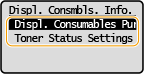
<Displ. Consumables Purchase Button (RUI)>
Select <Off> to prevent a button that accesses sites for purchasing toner cartridges, etc. from being displayed in the Remote UI.
Select <Off> to prevent a button that accesses sites for purchasing toner cartridges, etc. from being displayed in the Remote UI.
<Toner Status Settings>
If you do not want to use Toner Status, select <Off>. To prevent a button that accesses sites for purchasing toner cartridges, etc. from being displayed in Toner Status, select <On> and then <Off>.
If you do not want to use Toner Status, select <Off>. To prevent a button that accesses sites for purchasing toner cartridges, etc. from being displayed in Toner Status, select <On> and then <Off>.
<Google Cloud Print Settings> *2
Enable or disable Google Cloud Print. Registering the Machine with Google Cloud Print
|
<Enable Google Cloud Print>
<Off>
<On>
<Google Cloud Print Registration Status>
|
<PDL Selection (Plug and Play)>
Select a page description language so that the machine is detected as a printer that is compatible with that language when it is connected to a computer by using Plug and Play.
<Network> *2
Select a page description language so that the machine is detected as a printer that is compatible with that language when it is detected over the network.
|
<UFRII LT>
<UFRII LT (V4)>
|
<USB>
Select a page description language so that the machine is detected as a printer that is compatible with that language when it is connected to a computer via USB.
|
<UFRII LT>
<UFRII LT (V4)>
|
<Menu> <System Management Settings> <PDL Selection (Plug and Play)> Select <Network> or <USB> Select a page description language Restart the machine
<System Management Settings> <PDL Selection (Plug and Play)> Select <Network> or <USB> Select a page description language Restart the machine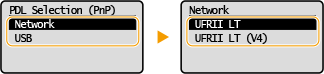
<UFRII LT>
Detects and connects the machine as a UFRII LT printer.
Detects and connects the machine as a UFRII LT printer.
<UFRII LT (V4)>
Detects and connects the machine as a UFRII LT printer that is compatible with XML Paper Specification (XPS).
Detects and connects the machine as a UFRII LT printer that is compatible with XML Paper Specification (XPS).
<Update Firmware>
Select how to install the firmware update according to the environment of the machine. Updating the Firmware
|
<Via PC>
<Via Internet>*2
<Version Information>
|
<Initialize Eco Report Counter>
Select to restore the Eco Report Counter settings to the factory defaults. Initializing Eco Report Counter
<Initialize Menu>
Select to restore the settings listed below to the factory defaults. You can restore all the settings listed below at once, or you can restore individual settings separately. Initializing Menu
|
<Preferences>
<Timer Settings> <Copy Settings>
<Scan Settings>
<Printer Settings>
<Adjustment/Maintenance>
<System Management Settings>
<Initialize All>
|
<Initialize All Data/Settings>
Restores all data including logs and setting values to their default settings. Initializing All Data/Settings