
Using AirPrint
This section describes the settings required to use AirPrint and the procedures to be performed using Apple devices.

|
AirPrint Settings
|
|
Functions of the AirPrint
|
|
Troubleshooting
|
Configuring AirPrint Settings
You can register information, including the name of the machine and installation location, that is used for identifying the machine. You can also disable the AirPrint function of the machine. Use the Remote UI to change these settings.
|
|
|
For more information about the basic operations to be performed when setting the machine from the Remote UI, see Setting Up Menu Options from Remote UI.
|
1
Start the Remote UI and log in to System Manager Mode. Starting Remote UI
2
Click [Settings/Registration] on the Portal page. Remote UI Screen
If you are using a mobile device, such as an iPad, iPhone, or iPod touch, read "click" as "tap" in this section.
3
Select [Network Settings]  [AirPrint Settings].
[AirPrint Settings].4
Click [Edit].
5
Specify the required settings.
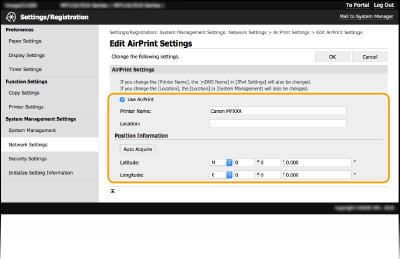
[Use AirPrint]
Select the check box to enable AirPrint. To disable AirPrint, clear the check box.
Select the check box to enable AirPrint. To disable AirPrint, clear the check box.
[Printer Name]
Enter the name of the machine. If an mDNS name has already been registered in [mDNS Settings] (Configuring DNS), the registered name is displayed.
Enter the name of the machine. If an mDNS name has already been registered in [mDNS Settings] (Configuring DNS), the registered name is displayed.
[Location]
Enter the location of the machine. If a location has already been registered in [Device Information] ([System Management] in [System Management Settings] (Settings/Registration)), the registered name is displayed.
Enter the location of the machine. If a location has already been registered in [Device Information] ([System Management] in [System Management Settings] (Settings/Registration)), the registered name is displayed.
[Latitude]
Enter the latitude of the location where the machine is installed.
Enter the latitude of the location where the machine is installed.
[Longitude]
Enter the longitude of the location where the machine is installed.
Enter the longitude of the location where the machine is installed.
6
Click [OK].
 |
If you select [Use AirPrint], the following settings are set to on.<Use HTTP>
[IPP Print Settings]
[Use mDNS] (IPv4 Settings)
[Use mDNS] (IPv6 Settings)
<Network Link Scan Settings>
|
|
|
|
If you change [Printer Name] that you have once specified, you may be unable to print any more from the Mac that has been able to be used for printing so far. This phenomenon occurs because [mDNS Name] (Configuring DNS) of IPv4 is also changed automatically. In this case, add the machine to the Mac again.
Entering the printer name makes it easier to identify multiple printers that support AirPrint.
|
Changing the Setting of Functions Available with AirPrint
If you want to disable functions that you are not going to use with AirPrint or encrypt communications, configure the necessary setting using the operation panel or Remote UI.
Changing Print Settings
To perform printing with AirPrint, IPP protocol is used.
|
Turning the Function On/Off
You can specify whether to perform printing with AirPrint. The factory default setting is [On].
Log in to the Remote UI in System Manager Mode (Starting Remote UI)
[Settings/Registration] [Network Settings] [TCP/IP Settings] [Edit] in [IPP Print Settings] Clear or select the [Use IPP Printing] check box [OK] |
|
Changing the TLS Setting
You can specify whether to encrypt communications using TLS when performing printing with AirPrint. The factory default setting is [On].
Log in to the Remote UI in System Manager Mode (Starting Remote UI)
[Settings/Registration] [Network Settings] [TCP/IP Settings] [Edit] in [IPP Print Settings] Clear or select the [Use TLS] check box [OK] |
Changing the Scan Setting
Configure the scan setting using AirPrint.
|
Set the Function to Enable or Disable
You can turn on/off the scan function available with AirPrint. The factory default setting is <On>.
<Menu>
<Network Settings> <TCP/IP Settings> <Network Link Scan Settings> Set <Use Network Link Scan> to <Off> or <On> |
|
Change TLS Settings
You can specify whether or not to encrypt TLS communications when scanning data using AirPrint. The factory default setting is <On>.
<Menu>
<Network Settings> <TCP/IP Settings> <Network Link Scan Settings> Set <Use TLS> to <Off> or <On> |
Displaying the Screen for AirPrint
You can display the screen for AirPrint, on which you can not only access the AirPrint Settings but also view information about consumables, such as paper and toner cartridge, etc. Further, you can configure security function settings.
1
Select [System Preferences] [Printers & Scanners], then add the machine to the Mac you are using.
[Printers & Scanners], then add the machine to the Mac you are using.If the machine has already been added, this operation is not required.
2
Select this machine from the list of printers in [Printers & Scanners].
3
Click [Options & Supplies].
4
Click [Show Printer Webpage].
5
Log in to the Remote UI.
To change the AirPrint settings, it is necessary to log in as an administrator.
AirPrint-Dedicated Page
When you log in with administrator privileges, the AirPrint-dedicated page is displayed as shown below.
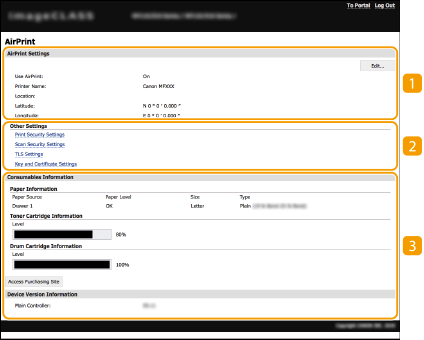
 [AirPrint Settings]
Enables you to check the values entered in the AirPrint settings, such as the name and location of the machine. You can click [Edit] to change the settings.
 [Other Settings]
[Print Security Settings]
Configure the print security settings using TLS or authentication.
[Scan Security Settings]
Configure the scan security settings using TLS.
[TLS Settings]
Enables you to change the key and certificate used for TLS. Configuring the Key and Certificate for TLS
[Key and Certificate Settings]
Enables you to generate and install a key and certificate, or request a certificate to be issued. Configuring the Key and Certificate for TLS
 [Consumables Information]
Enables you to check the information of a paper source and consumables of the machine and the device version.
Trademarks
Apple, Bonjour, iPad, iPhone, iPod touch, Mac, macOS, OS X and Safari are trademarks of Apple Inc., registered in the U.S. and other countries. AirPrint and the AirPrint logo are trademarks of Apple Inc.