System Options
The machine performance can be enhanced even more by installing system options.
PCL Printer KIT (imageRUNNER 2206N / 2006N)
This option supports PCL emulation printing solutions. It supports PCL5c/PCL6 emulation printing solutions.
License Registration
To activate certain system options, you need to obtain a license key and register the key to the machine.
Obtaining a License Key
You can obtain a license key by using a web browser. Access the License Management System (http://www.canon.com/lms/license) and follow the procedure. As a part of the procedure, you are required to enter the following numbers.
License Access Number
Check the license access number provided on the License Access Number Certificate that is included in the package of the option.
Serial Number of the Machine
Check the serial number of the machine from the control panel.
<Status Monitor>  <Device Information> <Serial Number>
<Device Information> <Serial Number>Registering a License Key
1
Select <Menu> in the <Home> screen. <Home> Screen
2
Select <System Management Settings>.
If the login screen appears, enter the correct ID and PIN. Logging on to the Machine (imageRUNNER 2206N / 2006N)
3
Select <Register License>.
4
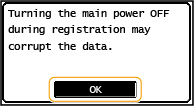
Confirm the message on the screen, and select <OK>.
5
Enter the license key using the numeric keys, and select <Apply>.
Registration starts. Wait until the <Installation complete. Effective after the main power is turned OFF and ON.> message is displayed.
6
Select <Close>.
7
Restart the machine.