Specifying Orientation of Your Document
 |
|
You can specify portrait or landscape orientation.
|
<Scan>  Specify a destination with <E-Mail>/<File> <Original Orientation> Select the document type
Specify a destination with <E-Mail>/<File> <Original Orientation> Select the document type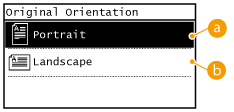
 <Portrait>
Select for documents with portrait orientation.
 <Landscape>
Select for documents with landscape orientation.