
<Access Files>
כל ההגדרות הקשורות להדפסת קבצים השמורים בזיכרון מופיעות עם תיאורים. הגדרות ברירת מחדל מסומנות בצלבון ( ).
).
).|
|
כוכביות (*)הגדרות המסומנות בכוכבית (*) עשויות שלא להופיע, בהתאם לדגם שבו אתה משתמש, באפשרויות או בפריטי הגדרות אחרים.
|
<Common Settings>
קבע את התצורה של הגדרות ברירת המחדל של הדפסת מדיית זיכרון.
<Access Stored Files Settings>
ניתן לשנות את ההגדרות להדפסת קבצים בהתקן זיכרון USB ואת השיטה להצגתם.
<Change Default Settings (Memory Media Print)>
ניתן לשנות את הגדרות ברירת המחדל הקשורות להדפסת מדיית זיכרון. ההגדרות שנקבעו כאן ישמשו בתור הגדרות ברירת המחדל של פונקציית הדפסת מדיית זיכרון. שינוי הגדרות ברירת המחדל של פונקציות
דגם מסך מגע
|
<Paper>
<Multi-Purpose Tray>
<Drawer 1>
<Drawer 2>*
<Number of Copies>
1
עד 999
<2-Sided Printing>
<Off>
<Book Type>
<Calendar Type>
<Set JPEG/TIFF Details>
<Brightness>
חמש רמות
<N on 1>
<Off>
<2 on 1>
<4 on 1>
<Original Type>
<Photo Priority>
<Text Priority> <Halftones>
<Gradation>
<Error Diffusion>
<
Set PDF Details>
<Brightness>
שבע רמות
<N on 1>
<Off>
<2 on 1>
<4 on 1>
<6 on 1>
<8 on 1>
<9 on 1>
<16 on 1>
<Print Range>
<All Pages>
<Specified Pages>
<Enlarge/Reduce to Fit Paper Size>
<Off>
<On>
<Enlarge Print Area>
<Off>
<On>
<Print Comments>
<Off>
<Auto>
<Other Settings>
<Halftones>
<Error Diffusion>
<Off>
<On>
<Resolution/Gradation>*
<Text>
<Resolution>
<Gradation>
<Graphics>
<Resolution>
<Gradation>
<Image>
<Resolution>
<Gradation>
<Pure Black Text>
<Off>
<On>
<Black Overprint>*
<Off>
<On>
<RGB Source Profile>
<sRGB>
<Gamma 1.5>
<Gamma 1.8>
<Gamma 2.4>
<None>
<CMYK Simulation Profile>
<JapanColor(Canon)>
<U.S. Web Coated v1.00(Canon)>
<Euro Standard v1.00(Canon)>
<None>
<Use Grayscale Profile>
<Off>
<On>
<Output Profile>
<Text>
<Normal>
<Photo>
<TR Normal>
<TR Photo>
<Graphics>
<Normal>
<Photo>
<TR Normal>
<TR Photo>
<Image>
<Normal>
<Photo>
<TR Normal>
<TR Photo>
<Matching Method>
<Perceptual>
<Saturation>
<Colorimetric>
<Composite Overprint>
<Off>
<On>
<Grayscale Conversion>
<sRGB>
<NTSC>
<Uniform RGB>
<Print Quality>
<Density>*
צהוב/מגנטה/ציאן/שחור
17 רמות
<Fine Adjust>
<Yellow>/<Magenta>/<Cyan>/<Black>
<High>/<Medium>/<Low>
17 רמות
<Toner Save>
<Off>
<On>
<Gradation>
<High 1>
<High 2>
<Density Fine Adjustment>
חמש רמות
<Resolution>
<1200 dpi>
<600 dpi>
<Special Smoothing Mode>
<Mode 1>
<Mode 2>
<Mode 3>
<Mode 4>
<Mode 5>
<Mode 6>
<Toner Volume Correction>
<Standard>
<Gradation Priority>
<Text Priority>
<Line Control>
<Resolution Priority>
<Gradation Priority>
<Width Adjustment>
<Off>
<On>
<Text>
<Line>
<Text and Line>
<Advanced Smoothing>
<Advanced Smoothing>
<Off>
<Level 1>
<Level 2>
<Apply to Graphics>*
<Off>
<On>
<Apply to Text>*
<Off>
<On>
<Gradation Smoothing>
<Gradation Smoothing>
<Off>
<Level 1>
<Level 2>
<Apply to Graphics>*
<Off>
<On>
<Apply to Images>*
<Off>
<On>
|
דגם LCD בשחור-לבן
|
<Number of Copies>
1
עד 999<Color Mode> <Color>
<Black & White> <Paper> <MP Tray>
<Drawer 1> <Drawer 2>*
<2-Sided Printing>
*
<Off>
<Book Type> <Calendar Type> <Set JPEG/TIFF Details> <N on 1>
<Off>
<2 on 1>
<4 on 1>
<Original Type>
<Photo Priority>
<Text Priority> <Brightness>
5 רמות
<Halftones>
<Gradation>
<Error Diffusion> <Set PDF Details> <Brightness>
7 רמות
<N on 1>
<Off>
<2 on 1>
<4 on 1>
<6 on 1>
<8 on 1>
<9 on 1>
<16 on 1>
<Print Range>
<All Pages>
<Specified Pages>
<Enlarge/Reduce to Fit Paper Size>
<Off>
<On> <Enlarge Print Area>
<Off>
<On> <Print Comments>
<Off>
<Auto> <Other>
<Halftones>
<Error Diffusion>
<Off>
<On>
<Resolution/Gradation>*
<Text>
<Resolution>
<Gradation>
<Graphics>
<Resolution>
<Gradation>
<Image>
<Resolution>
<Gradation>
<Pure Black Text>
<Off>
<On>
<Black Overprint>*
<Off>
<On>
<RGB Source Profile>
<sRGB>
<Gamma 1.5>
<Gamma 1.8>
<Gamma 2.4>
<None>
<CMYK Simulation Profile>
<JapanColor (Canon)>
<U.S. Web Coated v1.00 (Canon)>
<Euro Standard v1.00>
<None>
<Use Grayscale Profile>
<Off>
<On>
<Output Profile>
<Text>
<Normal>
<Photo>
<TR Normal>
<TR Photo>
<Graphics>
<Normal>
<Photo>
<TR Normal>
<TR Photo>
<Image>
<Normal>
<Photo>
<TR Normal>
<TR Photo>
<Matching Method>
<Perceptual>
<Saturation>
<Colorimetric>
<Composite Overprint>
<Off>
<On>
<Grayscale Conversion>*
<sRGB>
<NTSC> <Uniform RGB> <Print Quality>
<Density>*
<Density>
<Yellow>/<Magenta>/<Cyan>/<Black>
17 רמות
<Density (Fine Adjust)> <Yellow>/<Magenta>/<Cyan>/<Black> <High>/<Medium>/<Low> 17 רמות <Toner Volume Correction>
<Standard>
<Gradation Priority>
<Text Priority>
<Toner Save>
<Off>
<On>
<Gradation>
<High 1>
<High 2>
<Density Fine Adjustment>
חמש רמות
<Resolution>
<1200 dpi>
<600 dpi>
<Special Smoothing Mode>
<Mode 1>
<Mode 2>
<Mode 3>
<Mode 4>
<Mode 5>
<Mode 6>
<Line Control>
<Resolution Priority>
<Gradation Priority>
<Width Adjustment>
<Off>
<On>
<Text>
<Line>
<Text and Line>
<Advanced Smoothing>
<Advanced Smoothing>
<Off>
<Level 1>
<Level 2>
<Apply to Graphics>*
<Off>
<On>
<Apply to Text>*
<Off>
<On>
<Gradation Smoothing>
<Gradation Smoothing>
<Off>
<Level 1>
<Level 2>
<Apply to Graphics>*
<Off>
<On>
<Apply to Images>*
<Off>
<On>
|
<Default Display Settings> *
בחר בתצוגה מקדימה/תמונה ממוזערת/פרטים בתור השיטה להצגת קבצים בהתקן זיכרון USB.
|
<Preview>
<Thumbnail>
<Details> |
<Menu>  <Function Settings> <Access Files> <Common Settings> <Access Stored Files Settings> <Default Display Settings> בחר את השיטה להצגה
<Function Settings> <Access Files> <Common Settings> <Access Stored Files Settings> <Default Display Settings> בחר את השיטה להצגה 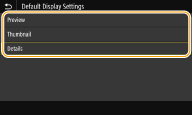
<Preview>
הצגת תמונה בתצוגה מקדימה.
הצגת תמונה בתצוגה מקדימה.
<Thumbnail>
מציג תמונות ממוזערות.
מציג תמונות ממוזערות.
<Details>
הצגת שמות הקבצים והתאריכים ברשימה.
הצגת שמות הקבצים והתאריכים ברשימה.
<File Sort Default Settings>
בחר אם להציג קבצים בהתקן זיכרון USB בסדר עולה או יורד של שם קובץ או תאריך.
|
<Name (Ascending)>
<Name (Descending)>
<Date/Time (Ascending)>
<Date/Time (Descending)>
|
<Menu> <Function Settings> <Access Files> <Common Settings> <Access Stored Files Settings> <File Sort Default Settings> בחר את סדר הצגת הקבצים
<Function Settings> <Access Files> <Common Settings> <Access Stored Files Settings> <File Sort Default Settings> בחר את סדר הצגת הקבצים <File Name Display Format>
בחר אם להציג טקסט קצר או ארוך של שמות קבצים השמורים בהתקן זיכרון USB.
|
<Short File Name>
<Long File Name> |
<Menu> <Function Settings> <Access Files> <Common Settings> <Access Stored Files Settings> <File Name Display Format> בחר <Short File Name> או <Long File Name>
<Function Settings> <Access Files> <Common Settings> <Access Stored Files Settings> <File Name Display Format> בחר <Short File Name> או <Long File Name> 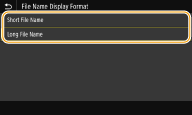
<Short File Name>
קיצור שם קובץ לאורך של עד שמונה תווים. כדי להבחין בין קבצים בעלי שמות דומים, מספרים כגון "~1" או "~2" יתווספו לסוף שם הקובץ.
קיצור שם קובץ לאורך של עד שמונה תווים. כדי להבחין בין קבצים בעלי שמות דומים, מספרים כגון "~1" או "~2" יתווספו לסוף שם הקובץ.
<Long File Name>
עבור דגם מסך מגע, מוצג שם קובץ באורך של עד 40 תווים ראשונים. עבור דגם LCD בשחור-לבן, מוצג שם קובץ באורך של עד 20 תווים ראשונים.
עבור דגם מסך מגע, מוצג שם קובץ באורך של עד 40 תווים ראשונים. עבור דגם LCD בשחור-לבן, מוצג שם קובץ באורך של עד 20 תווים ראשונים.

מספר התווים המתואר לעיל לא כולל את התווים שבסיומות הקובץ, כגון ".jpg".
|
<Memory Media Settings>
קבע אם להפעיל או להשבית את הפונקציות של התקן זיכרון USB.
<Use Print Function>
בחר אם לאפשר הדפסה של נתונים מהתקן זיכרון USB כאשר הוא מחובר למכשיר. הגבלת פונקציית ההדפסה ל-USB
LBP664Cx
|
<Off>
<On>
|
LBP663Cdw / LBP623Cdw / LBP621Cw
|
<Off>
<On>
|