
XPS
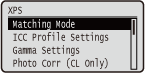 | כל ההגדרות אודות קובצי XPS הזמינות עבור הדפסה ישירה מ-USB והדפסה ישירה מוצגות בצירוף תיאורים קצרים. הגדרות ברירת מחדל מסומנות בצלבון (  ). ). |
|
כוכביות (*)הגדרות המסומנות בכוכבית (*) עשויות שלא להופיע, בהתאם לאפשרויות או לפריטי הגדרות אחרים. |
Matching Mode
בחר במצב עיבוד עבור הדפסת צבע.
ICC Profile Gamma |
 (
( )
)  <XPS>
<XPS>  <Matching Mode> <ICC Profile> או <Gamma>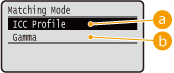
 <ICC Profile>
השתמש בפרופיל עבור התאמת צבעים.
 <Gamma>
בצע תיקון צבע על ידי הגדרת ערך גאמה להתאמת הבהירות.
ICC Profile Settings
הגדר את הפרופיל שישמש בעת ביצוע התאמת צבעים וציין איזה אלמנט יקבל עדיפות על פני אחרים. אתה יכול להגדיר פריט זה לכל אחד מסוגי התמונה הכלולים במסמך אחד.
RGB Source Profile
בחר בפרופיל מתאים עבור נתוני RGB שתואמים לצג שבשימוש.
Text sRGB v3.0 (Canon) Canon HDTV גאמה 1.5 Canon HDTV גאמה 1.8 Canon HDTV גאמה 2.4 Graphics sRGB v3.0 (Canon) Canon HDTV גאמה 1.5 Canon HDTV גאמה 1.8 Canon HDTV גאמה 2.4 Image sRGB v3.0 (Canon) Canon HDTV גאמה 1.5 Canon HDTV גאמה 1.8 Canon HDTV גאמה 2.4 |
() <XPS> <ICC Profile Settings> <RGB Source Profile> בחר את סוגי נתוני התמונה בחר את הפרופיל 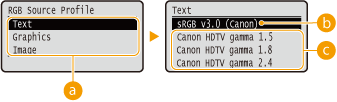
סוג נתוני תמונה
בחר את סוג נתוני התמונה שברצונך לשנות עבורו את ההגדרות. בחר באפשרות <Text> עבור תווים, <Graphics> עבור קווים ותרשימים, או <Image> עבור תמונות.
<sRGB v3.0 (Canon)>
משתמשים בפרופיל RGB שדומה לפרופיל הממוצע של מרבית צגי המחשב האישי של Windows. בעת שימוש בצג התומך ב-sRGB, באפשרותך להדפיס צבעים קרובים לצבעים המוצגים על הצג.
 <Canon HDTV גאמה 1.5> עד <Canon HDTV גאמה 2.4>
כשרוצים התאמת בהירות לאחר ביצוע השוואה בין הצבעים המודפסים והצבעים המוצגים על הצג, הגדר הגדרה הכרחית כאן. ככל שהערך גבוה יותר, כך הצבעים המודפסים כהים יותר.
|
הגדרה זו זמינה כשההגדרה <Matching Mode> מוגדרת לאפשרות <ICC Profile>. |
Output Profile
אתה יכול לבחור בפרופילים שמתאימים לנתונים שאתה עומד להדפיס.
Text Normal Photo Graphics Normal Photo Image Normal Photo |
() <XPS> <ICC Profile Settings> <Output Profile> בחר את סוג נתוני התמונה <Normal> או <Photo> 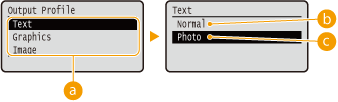
סוג נתוני תמונה
בחר את סוג נתוני התמונה שברצונך לשנות עבורו את ההגדרות. בחר באפשרות <Text> עבור תווים, <Graphics> עבור קווים ותרשימים, או <Image> עבור תמונות.
<Normal>
התאמת צבעים מבוצעת כך שהנתונים מודפסים בצבעים הקרובים לצבעים שמוצגים על הצג.
<Photo>
התאמת צבעים מבוצעת כך שתוצאת ההדפסה דומה לצילום.
|
הגדרה זו זמינה כשההגדרה <Matching Mode> מוגדרת לאפשרות <ICC Profile>. |
Matching Method
ציין איזה אלמנט יקבל עדיפות על פני אחרים בהתאמת צבעים על ידי [RGB Source Profile]. אתה יכול להגדיר פריט זה לכל אחד מסוגי התמונה הכלולים במסמך אחד.
Text Perceptual Saturation Colorimetric Graphics Perceptual Saturation Colorimetric Image Perceptual Saturation Colorimetric |
() <XPS> <ICC Profile Settings> <Matching Method> בחר את סוג נתוני התמונה בחר את השיטה התואמת 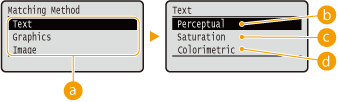
סוג נתוני תמונה
בחר את סוג נתוני התמונה שברצונך לשנות עבורו את ההגדרות. בחר באפשרות <Text> עבור תווים, <Graphics> עבור קווים ותרשימים, או <Image> עבור תמונות.
<Perceptual>
ההתאמה מתבצעת עם עדיפות שניתנה לתפיסה חושית.
<Saturation>
ההתאמה מתבצעת עם עדיפות שניתנה לרוויה.
 <Colorimetric>
התאימות מתבצעת כך שערכי הצבע של RGB ישוחזרו בצורה מדויקת ככל האפשר.
Gamma Settings
קבע אם לבצע תיקון צבע על ידי הגדרת ערך גאמה להתאמת הבהירות.
Gamma Correction
ניתן לבצע התאמת בהירות כך שהבהירות של החלקים הבהירים והכהים ביותר של המקור לא תושפע מתוצאת ההדפסה. אתה יכול להגדיר פריט זה לכל אחד מסוגי התמונה הכלולים במסמך אחד.
Text 1.0 1.4 1.8 2.2 Graphics 1.0 1.4 1.8 2.2 Image 1.0 1.4 1.8 2.2 |
() <XPS> <Gamma Settings> <Gamma Correction> בחר את סוג נתוני התמונה בחר את ערך ההגדרה 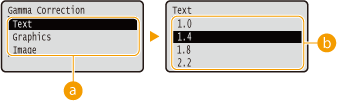
סוג נתוני תמונה
בחר את סוג נתוני התמונה שברצונך לשנות עבורו את ההגדרות. בחר באפשרות <Text> עבור תווים, <Graphics> עבור קווים ותרשימים, או <Image> עבור תמונות.
<1.0> עד <2.2>
הגדר פריט זה כשברצונך להתאים את בהירות ההדפסות. <1.4> היא ההגדרה הסטנדרטית (לא תיקון), וככל שהערך המוגדר גדול יותר, כך ההדפסה תהיה כהה יותר.
|
הגדרה זו זמינה כשההגדרה <Matching Mode> מוגדרת לאפשרות <Gamma>. |
Photo Corr (CL Only)
קבע הגדרות לפונקציות תיקון עבור תמונות או נתוני תמונה דומים אחרים.
Photo Optimizer PRO
הגדר אם לבצע הדפסה על ידי תיקון אוטומטי של ניגודיות, איזון צבע, רוויה ומעבר הדרגתי.
Off On |
() <XPS> <Photo Corr (CL Only)> <Photo Optimizer PRO> <Off> או <On> Red-Eye Correction
"עין-אדומה" היא תופעה הגורמת לעיניהם של פרטים אנושיים בצילומי פלאש/ הבזק להופיע בצבע אדמדם לא טבעי. הגדר אם לאתר אוטומטית עין-אדומה בתמונה ולתקן את החלקים המדוברים כך שהן יופיעו בצבע טבעי. אתה יכול לבחור את רמת חוזק התיקון מבין שלושה.
Red-Eye Correction
קבע אם לבצע תיקון עין אדומה.
Off On |
() <XPS> <Photo Corr (CL Only)> <Red-Eye Correction> <Red-Eye Correction> <Off> או <On> Red-Eye Corr. Level *
ציין את רמת חוזק התיקון כאשר <Red-Eye Correction> מוגדר ל- <On>.
Weak Standard Strong |
() <XPS> <Photo Corr (CL Only)> <Red-Eye Correction> <Red-Eye Corr. Level> בחר את הרמה Face Brightener
לתמונת תצלום שבה פניהם של פרטים אנושיים כהים בצורה לא טבעית בגלל תאורה אחורית או תת-חשיפה, הגדר אם להדפיס את התמונה תוך תיקון כלל בהירותה כך שפני הנבדקים יתבהרו באופן טבעי. אתה יכול לבחור את רמת חוזק התיקון מבין שלושה.
Face Brightener
קבע אם לבצע תיקון כדי להבהיר את פני האנשים.
Off On |
() <XPS> <Photo Corr (CL Only)> <Face Brightener> <Face Brightener> <Off> או <On> Face Brightener Lv. *
ציין את רמת חוזק התיקון כאשר <Face Brightener> מוגדר ל- <On>.
Weak Standard Strong |
() <XPS> <Photo Corr (CL Only)> <Face Brightener> <Face Brightener Lv.> בחר את הרמה Halftones
ניתן לבחור את שיטת ההדפסה המשמשת להפקת חצאי גוונים (טווח הביניים בין האזורים הבהירים יותר לבין האזורים הכהים יותר של תמונה).
Error Diffusion
מצב זה מתאים להדפסת נתונים עם טקסט ושורות דקות והקווים המעוקלים של נתוני CAD וכדומה.
Off On |
() <XPS> <Halftones> <Error Diffusion> <Off> או <On> |
יציבות המרקם והטונר המותקן עלולים להיות קטנים יותר כאשר <Error Diffusion> בשימוש. |
Resolution/Grad. *
בחר את שיטת הפקת חצאי הגוונים כאשר <Error Diffusion> מוגדר לאפשרות <Off>. אתה יכול להגדיר פריט זה לכל אחד מסוגי התמונה הכלולים במסמך אחד.
Text Resolution Gradation Graphics Resolution Gradation Image Resolution Gradation |
() <XPS> <Halftones> <Resolution/Grad.> בחר את סוג נתוני התמונה <Resolution> או <Gradation> 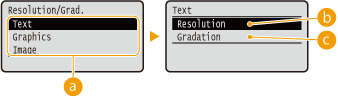
סוג נתוני תמונה
בחר את סוג נתוני התמונה שברצונך לשנות עבורו את ההגדרות. בחר באפשרות <Text> עבור תווים, <Graphics> עבור קווים ותרשימים, או <Image> עבור תמונות.
<Resolution>
מבצעת הדפסה איכותית על ידי הפקה חדה של שולי התווים. מצב הדפסה זה מתאים עבור נתוני הדפסה של תווים וקווים דקים עם גימור ברור.
<Gradation>
שינוי הדרגתי של התדפיסים וקווים בעלי גימור חלק. מצב הדפסה זה מתאים להדפסת תרשימים וטבלאות עם שינוי הדרגתי.
Gray Compensation
עבור נתונים שחורים או אפורים עם מידע צבע המגדיר R = G = B, בחר אם להדפיס עם טונר שחור (K) בלבד או להדפיס עם טונר CMYK 4-צבעים. אתה יכול להגדיר פריט זה לכל אחד מסוגי התמונה הכלולים במסמך אחד.
Text Off On Graphics Off On Image Off On |
() <XPS> <Gray Compensation> בחר את סוג נתוני התמונה <Off> או <On> 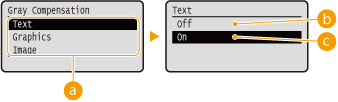
סוג נתוני תמונה
בחר את סוג נתוני התמונה שברצונך לשנות עבורו את ההגדרות. בחר באפשרות <Text> עבור תווים, <Graphics> עבור קווים ותרשימים, או <Image> עבור תמונות.
<Off>
מדפיס עם טונר CMYK 4 צבעים. שיחזור המעבר ההדרגתי של הצבעים הכהים יותר טוב יותר מאשר עם <On>.
<On>
מדפיס עם טונר שחור (K) בלבד. ניתן למנוע אי-תאימות צבע כתוצאה משימוש בטונר צבעוני (CMY).
Advanced Smoothing
בצע הגדרות למצב ההחלקה המאפשר הדפסה חלקה של קווים, דמויות וטקסט.
Advanced Smoothing
ציין אם להפעיל או לבטל את מצב ההחלקה. קצוות יהיו חלקים יותר עם <Smooth 2> מאשר עם <Smooth 1>.
Off Smooth 1 Smooth 2 |
() <XPS> <Advanced Smoothing> <Advanced Smoothing> בחירה של שיטת העיבוד Graphics *
קבע אם ליישם את תהליך ההחלקה על קווים ודמויות כשהאפשרות <Advanced Smoothing> מוגדרת כ-<Smooth 1> או כ-<Smooth 2>.
Off On |
() <XPS> <Advanced Smoothing> <Graphics> <Off> או <On> Text *
קבע אם ליישם את תהליך ההחלקה על טקסט כאשר <Advanced Smoothing> מוגדרת כ-<Smooth 1> או כ-<Smooth 2>.
Off On |
() <XPS> <Advanced Smoothing> <Text> <Off> או <On> Grayscale Conversion
באפשרותך לבחור את השיטה להמרת נתונים צבעוניים לנתוני שחור-לבן.
Text sRGB NTSC Uniform RGB Graphics sRGB NTSC Uniform RGB Image sRGB NTSC Uniform RGB |
() <XPS> <Grayscale Conversion> בחר את סוג נתוני התמונה בחר את שיטת ההמרה 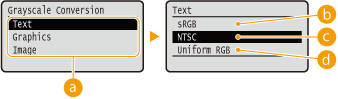
סוג נתוני תמונה
בחר את סוג נתוני התמונה שברצונך לשנות עבורו את ההגדרות. בחר באפשרות <Text> עבור תווים, <Graphics> עבור קווים ותרשימים, או <Image> עבור תמונות.
<sRGB>
נתוני צבע מומרים לנתוני שחור-לבן כדי ליצור שינוי הדרגתי, חלק ומכוון בצבע.
<NTSC>
נתוני צבע מומרים לנתוני שחור-לבן כדי ליצור מראה שווה ערך לתמונות המופקות בטלוויזיה (NTSC).
<Uniform RGB>
נתוני צבע מומרים לנתוני שחור-לבן כדי להפוך את כל רמות ה-RGB לאחידות בהתאם לבהירות בלבד.
|
פריט זה זמין כאשר <Color Mode> (Color Mode) תחת <Print Quality> מוגדר ל- <Black>. |