Paper Output
Finishing
[Off], [Collate], [Group]*, [Rotate+Collate], [Rotate+Group], [Offset+Collate], [Offset+Group], [Staple+Collate], [Staple+Group], [Eco(Stpl-Fr)+Col], [Eco(Stpl-Fr)+Grp]
Copies to Offset (Offset+Collate):
1 to 9999; 1*
Staple Position (Staple+Collate), (Staple+Group):
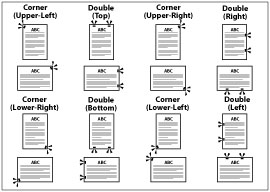
Corner (Upper-L), Double (Top), Corner (Upper-R), Double (Right), Corner (Lower-R), Double (Bottom), Corner (Lower-L), and Double (Left)
Staple Position (Eco(Stpl-Fr)+Col), (Eco(Stpl-Fr)+Grp):
Corner (Upper-L), Corner (Upper-R), Corner (Lower-R), and Corner (Lower-L)
Some of the above options require specific delivery trays and may not be available unless appropriate delivery trays are attached.
 : Available - : Unavailable
No Options Inner 2Way Tray-L | Inner Finisher-J | |
Collate | | |
Group | | |
Rotate+Collate | | - |
Rotate+Group | | - |
Offset+Collate | - | |
Offset+Group | - | |
Staple+Collate | - | |
Staple+Group | - | |
Eco(Stpl-Fr)+Col | - | |
Eco(Stpl-Fr)+Grp | - | |
[Off]
This setting prints all copies of the same page before printing the next page.
[Collate]
This setting prints all pages of each copy before printing the next copy.
[Group]
This setting prints all copies of the same page before printing the next page.
[Rotate+Collate]
This setting prints all pages of each copy (collating), and rotates every other complete copy 90 degrees to indicate where each copy starts.
[Rotate+Group]
This setting prints all copies of the same page before printing the next page. It rotates every other complete set of pages to indicate where each new set starts.
[Offset+Collate]
This setting prints all pages of each copy (collating). It offsets every other complete copy by the number specified with this setting to indicate where each copy starts.
[Offset+Group]
This setting prints all copies of the same page before printing the next page. It offsets every other complete set of pages to indicate where each new set starts.
[Staple+Collate]
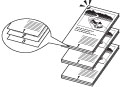
This setting prints all pages of each copy (collating), and prepares them for stapling according to the option selected for [Staple+Collate].
[Staple+Group]
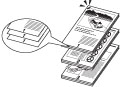
This setting prints all copies of the same page before printing the next page, and prepares them for stapling according to the option selected for [Staple+Group].
[Eco(Stpl-Fr)+Col]
This setting prints all pages of each copy (collating), and prepares them for binding without staples.
[Eco(Stpl-Fr)+Grp]
This setting prints all copies of the same page before printing the next page, and prepares them for binding without staples.
Examples of each Finishing option when printing three copies of a three page document:
Off | Collate | Group |
 |  | |
Rotate+Collate | Rotate+Group | |
 |  | |
Offset+Collate | Offset+Group | |
 |  | |
Staple+Collate, Eco(Stpl-Fr)+Col | Staple+Group, Eco(Stpl-Fr)+Grp | |
 |  |
IMPORTANT |
A large print job may be automatically cancelled by the machine. |
NOTE |
[Rotate+Collate] and [Rotate+Group] are available if the paper size is LTR, LTRR, A4, A4R, B5, or B5R. If [Rotate+Collate] or [Rotate+Group] is selected, part of the print image may be cut off when the image is rotated. You need to load the same size paper as the original in the paper drawers in both landscape and portrait positions. If you do not, all the sheets will be printed in the orientation that the loaded paper is in. [Offset+Collate] and [Offset+Group] are available if the paper size is A3, B4, A4, A4R, B5, 11"x17", LGL, LTR, LTRR, EXEC. |
When you select [Staple+Collate], [Staple+Group], [Eco(Stpl-Fr)+Col], or [Eco(Stpl-Fr)+Grp], you can select the stapling position.
NOTE |
When you are stapling paper in landscape orientation, the image orientation and the staple position may not match. |
Paper That Can Be Stapled and Staple Position.
: Available - : UnavailableCorner (Upper-Left) | Double (Top) | Corner (Upper- Right) | Double (Right) | Corner (Lower- Right) | Double (Bottom) | Corner (Lower-Left) | Double (Left) | |
11" x 17" | *2 | | *2 | - | *2 | | *2 | - |
LGL | | | | - | | | | - |
LTR | *2 | - | *2 | | *2 | - | *2 | |
LTRR | | | *1 | - | | | *1 | - |
EXEC | | - | | | | - | | |
A3 | *2 | | *2 | - | *2 | | *2 | - |
B4 | *2 | | *2 | - | *2 | | *2 | - |
A4 | *2 | - | *2 | | *2 | - | *2 | |
A4R | | | *1 | - | | | *1 | - |
B5 | *2 | - | *2 | | *2 | - | *2 | |
*1: Will be stapled parallel to the edge of the paper.
*2: You can also set the Eco (Staple-Free) mode.
NOTE |
The maximum number of sheets of plain type paper that can be stapled at one time is: A3, B4, A4R, 11" x 17", LGL, LTRR: 30 sheets A4, B5, LTR, EXEC: 50 sheets The number of sheets of plain paper that can be stapled with the Eco (Staple-Free) mode are 5 sheets. |