
Select Feeder Menu
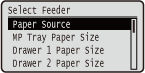 | The settings about the paper source and the size of paper loaded in the machine are listed with short descriptions. When you press  ( ( ) on the operation panel, the Select Feeder menu is displayed. Default settings are marked with a dagger ( ) on the operation panel, the Select Feeder menu is displayed. Default settings are marked with a dagger ( ). ). |
|
Common settingsThe settings are the same as those for <Paper Source> in the Setup Menu. The settings specified here are also applied to the <Paper Source> settings. Asterisks (*)Settings marked with an asterisk (*) may not be displayed depending on the model you are using, options, or other setting items. |
Paper Source
Select the paper source from which paper is fed. When you want to automatically change the paper source based on the paper size and paper type, select <Auto>.
Auto Multi-Purpose Tray Drawer 1 Drawer 2 * Drawer 3 * Drawer 4 * |
()  <Paper Source>
  Select the paper source
 MP Tray Paper Size
Specify the size of the paper that is loaded in the multi-purpose tray. Specifying Paper Size and Type in the Multi-Purpose Tray
A6  A5 A5 A5R A5RB5 A4 LTR LGL EXEC Free Size Custom SizeCustom Size RPostcard Reply Postcard 4on1 Postcard Env. Nagagata3 Env. Younaga 3 Env. ISO-C5 Env. Monarch Env. No.10 Env. DL India-LGL Index Card STMT FLSC 16K |
Drawer N Paper Size (N=1, 2, 3, 4) *
Set the size of paper loaded in the machine's paper drawer or optional paper feeder's paper drawer. Specifying Paper Size and Type in the Paper Drawer
A6 A5A5RB5 A4 LTR LGL EXEC Free Size Custom SizeCustom Size RIndia-LGL STMT FLSC 16K |
Standard Paper Size
Set the default paper size. Printing will be performed with the paper size set here when you want to print from an OS not supporting printer drivers or a mobile device or other device not supporting paper size settings.
A6 A5 B5 A4 LTR LGL EXEC Postcard Reply Postcard 4on1 Postcard Env. Nagagata3 Env. Younaga 3 Env. ISO-C5 Env. Monarch Env. No.10 Env. DL India-LGL Index Card STMT FLSC 16K |
() <Standard Paper Size> Select the paper size 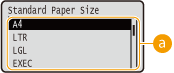
 Selecting the paper size
Specify the setting according to the size of the paper to print on.
MP Tray Priority
Select whether to prioritize paper feeding from the multi-purpose tray when <Paper Source> is set to <Auto>. If you select <On>, paper is fed from the multi-purpose tray when the same size paper is loaded in both the multi-purpose tray and the paper drawer.
Off On |
() <MP Tray Priority> <Off> or <On> |
When <MP Tray for Mix Ppr.> is set to <On>, paper is preferentially fed from the paper drawer even if <MP Tray Priority> is set to <On>. |
MP Tray for Mix Ppr.
If you select <On> with <Paper Source> set to other than <Multi-Purpose Tray>, the multi-purpose tray is automatically selected when appropriate size paper is not loaded in any paper drawer.
Off On |
() <MP Tray for Mix Ppr.> <Off> or <On> Auto Select Drawer
If you select <Use> with <Paper Source> set to <Auto>, the machine automatically selects the paper source with appropriate size paper loaded. Also, when the paper runs out, this setting enables continuous printing by switching from one paper source to another that is loaded with the same paper size.
Do Not Use Use |
() <Auto Select Drawer> Select the paper source <Do Not Use> or <Use> 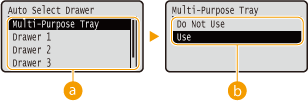
Paper source selection
Select the paper source to which you want to apply the Auto Select Drawer function.
 Switching of the settings
Select <Use> to enable automatic drawer selection for the paper source you selected on the previous screen ().
).Default Paper Type
Set the default paper type. Printing will be performed with the paper type set here when you want to print from an OS not supporting printer drivers or a mobile device or other device not supporting paper type settings.
Thin 1 Plain 1 Plain 2 Heavy 1 Heavy 2 Heavy 3 Heavy 4 Postcard Envelope Envelope H Labels Bond 1 Bond 2 Bond 3 |
() <Default Paper Type> Select the paper type 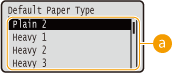
Paper type selection
Specify the settings in the same way as the paper settings in the printer driver according to the paper type for printing. Loading Paper
 |
Printing will be performed with the paper type set here if [Paper Type] is set to [Printer Default] on the printer driver side and the type of the paper loaded in the paper source is set to <Mixed Types> on the machine side. |
MP Tray Paper Type
Set the type of paper loaded in the multi-purpose tray. Specifying Paper Size and Type in the Multi-Purpose Tray
Thin 1 Plain 1 Plain 2 Heavy 1 Heavy 2 Heavy 3 Heavy 4 Postcard Envelope Envelope H Labels Bond 1 Bond 2 Bond 3 Mixed Types |
Drawer N Paper Type (N=1, 2, 3, 4) *
Set the type of paper loaded in the paper drawer.Specifying Paper Size and Type in the Paper Drawer
Thin 1 Plain 1 Plain 2 Heavy 1 Heavy 2 Bond 1 Bond 2 Bond 3 Mixed Types |
Manual 2-Sided (MP)
If printouts on the back side of printed paper are too light, select <2nd Side>.
1st Side 2nd Side |
() <Manual 2-Sided (MP)> <1st Side> or <2nd Side> 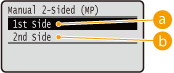
<1st Side>
Select to print on the front side (the side to print first).
<2nd Side>
Select to print on the back side (the opposite of the side that is already printed).
2-Sided Printing
Select whether to print on both sides of paper.
Off On |
() <2-Sided Printing> <Off> or <On>