
MEAP Settings
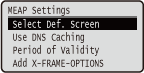 | The setting items about the main screen on MEAP are listed with short descriptions. Default settings are marked with a dagger (  ). ). |
|
Asterisks (*)Settings marked with an asterisk (*) may not be displayed depending on the model you are using, options, or other setting items. |
Select Def. Screen
You can specify the screen that appears on the display of the operation panel when the machine starts up.
Print Screen MEAP |
 (
( )
)  <MEAP Settings>
  <Select Def. Screen> <Print Screen> or <MEAP>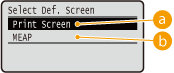
 <Print Screen>
The print standby screen (main screen) is displayed.
 <MEAP>
The screen of an installed MEAP application is displayed if any installed.
 |
You can press  ( ( ) on the operation panel to change the screens of the display. ) on the operation panel to change the screens of the display. |
Use DNS Caching
You can specify whether to hold in memory the DNS information with which search by a MEAP application has succeeded. Selecting <On (Specify Period)> allows for temporary holding and makes it possible to specify a valid holding period (Period of Validity).
Off On (Unlimited Use) On (Specify Period) |
() <MEAP Settings> <Use DNS Caching> Select the setting value Period of Validity *
When the setting of <Use DNS Caching> is <On (Specify Period)>, specify the time period for which to hold the DNS information in memory.
1 to 60 to 120 (seconds) |
() <MEAP Settings> <Period of Validity> Use the numeric keys to set the time period Add X-FRAME-OPTIONS
Specify whether to add X-FRAME-OPTIONS to the header when the HTTP server returns a response. Adding X-FRAME-OPTIONS prevents the information from overlapping on contents generated by other servers.
Off On |
() <MEAP Settings> <Add X-FRAME-OPTIONS> <Off> or <On>