
<Device Management>
All the settings related to management of information for the hardware and operations, as well as about management of data required when using the machine functions are listed with descriptions. Default settings are marked with a dagger ( ).
).
). |
Asterisks (*)Settings marked with "*1" cannot be imported or exported. Settings marked with "*2" may be unavailable or vary or have different defaults depending on your country or region. |
<Device Information Settings> 
Enter alphanumeric characters for the name and the installation location to identify the machine.
<Device Name> <Location> |
<Menu>  <Management Settings> <Device Management> <Device Information Settings> Select <Device Name> or <Location> Enter the device name or location (Entering Text) <Apply>
<Management Settings> <Device Management> <Device Information Settings> Select <Device Name> or <Location> Enter the device name or location (Entering Text) <Apply> <Select Country/Region> *1 *2
Specify the country or region where the machine is used. The settings that are displayed vary depending on the country or region of purchase. The default setting may vary depending on the setting selected at initial power-on.
<Hong Kong (HK)> <Singapore (SG)> <Malaysia (MY)> <Vietnam (VN)> <Argentina (AR)> <Other (Asia)> <Other (Latin America)> <Australia (AU)> <Korea (KR)> <New Zealand (NZ)> <Other> |
<Menu> <Management Settings> <Device Management> <Select Country/Region> Select a country or region
<Management Settings> <Device Management> <Select Country/Region> Select a country or region <Display Job Log>
Select whether to display printing logs on the machine display.
<Off> <On> |
Touch panel model
<Menu> <Management Settings> <Device Management> <Display Job Log> Select <Off> or <On> <OK> Restart the machine
<Management Settings> <Device Management> <Display Job Log> Select <Off> or <On> <OK> Restart the machineBlack and white LCD model
<Menu> <Management Settings> <Device Management> <Display Job Log> Select <Off> or <On> Restart the machine
<Management Settings> <Device Management> <Display Job Log> Select <Off> or <On> Restart the machine<Display Consumables Information (RUI/Toner Status)>/<Displ. Consmbls. Info (RUI/Toner Status)>
Set whether to display a button in the Remote UI or Toner Status for accessing the Web site for purchasing toner cartridges. Also set whether to use Toner Status.
<Displ. Cnsmbls. Purch. Btn.(RUI)>/<Displ. Consumables Purchase Button (RUI)> <Off> <On> <Toner Status Settings> <Off> <On> <Displ. Consmbls. Purchase Btn.> <Off> <On> |
<Menu> <Management Settings> <Device Management> <Display Consumables Information (RUI/Toner Status)>/<Displ. Consmbls. Info (RUI/Toner Status)> Specify the settings
<Management Settings> <Device Management> <Display Consumables Information (RUI/Toner Status)>/<Displ. Consmbls. Info (RUI/Toner Status)> Specify the settings 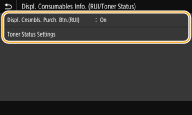
<Displ. Cnsmbls. Purch. Btn.(RUI)>/<Displ. Consumables Purchase Button (RUI)>
Select <Off> to prevent a button that accesses sites for purchasing toner cartridges from being displayed in the Remote UI.
Select <Off> to prevent a button that accesses sites for purchasing toner cartridges from being displayed in the Remote UI.
<Toner Status Settings>
If you do not want to use Toner Status, select <Off>. To prevent a button that accesses sites for purchasing toner cartridges from being displayed in Toner Status, select <On> and then <Off>.
If you do not want to use Toner Status, select <Off>. To prevent a button that accesses sites for purchasing toner cartridges from being displayed in Toner Status, select <On> and then <Off>.
<Notify to Check Paper Settings>
Specify whether to display a message prompting you to check paper settings when loading the paper drawer into the machine.
<Off> <On> |
Touch panel model
<Menu> <Management Settings> <Device Management> <Notify to Check Paper Settings> Select <Off> or <On> <OK> Restart the machine
<Management Settings> <Device Management> <Notify to Check Paper Settings> Select <Off> or <On> <OK> Restart the machineBlack and white LCD model
<Menu> <Management Settings> <Device Management> <Notify to Check Paper Settings> Select <Off> or <On> Restart the machine
<Management Settings> <Device Management> <Notify to Check Paper Settings> Select <Off> or <On> Restart the machine<Canon Genuine Mode>
The mode for when Canon genuine toner cartridges are used.
<Off> <On> |
<Menu> <Management Settings> <Device Management> <Canon Genuine Mode> Select <Off> or <On>
<Management Settings> <Device Management> <Canon Genuine Mode> Select <Off> or <On>  |
When necessary, the service representative may change the setting. If this item is not displayed, contact the administrator of the machine. |