Problems with Printing Results
The printed image is displaced or skewed.
 Are the paper guides misaligned?
Match the paper guides with the paper loaded in the paper source.
Images are uneven or faint.
Is the paper damp?
Replace the paper with paper that is not damp.
Are the gradation and density set appropriately?
Perform gradation adjustment.
Adjusting Gradation
Adjusting Gradation
Drum or wire is dirty. (8700 Series / 6700 Series only)
Press  (Settings/Registration)
  <Adjustment/Maintenance> <Maintenance> <Clean Drum> to clean the drum. If the problem persists, press (Settings/Registration) <Adjustment/Maintenance> <Maintenance> <Clean Wire> to clean the wire.
(Settings/Registration) <Adjustment/Maintenance> <Maintenance> <Clean Drum> to clean the drum. If the problem persists, press (Settings/Registration) <Adjustment/Maintenance> <Maintenance> <Clean Wire> to clean the wire.Printouts appear dirty or smudged. (8700 Series / 6700 Series / 4700 Series only)
Drum or wire is dirty. (8700 Series / 6700 Series only)
Press (Settings/Registration) <Adjustment/Maintenance> <Maintenance> <Clean Drum> to clean the drum. If the problem persists, press (Settings/Registration) <Adjustment/Maintenance> <Maintenance> <Clean Wire> to clean the wire.
(Settings/Registration) <Adjustment/Maintenance> <Maintenance> <Clean Drum> to clean the drum. If the problem persists, press (Settings/Registration) <Adjustment/Maintenance> <Maintenance> <Clean Wire> to clean the wire.The Pressure Roller/film for Fixing is dirty. (4700 Series only)
Press (Settings/Registration) <Adjustment/Maintenance> <Maintenance> <Clean Pressure Roller/Film for Fixing> to clean the Pressure Roller/film for Fixing.
(Settings/Registration) <Adjustment/Maintenance> <Maintenance> <Clean Pressure Roller/Film for Fixing> to clean the Pressure Roller/film for Fixing.Black streaks appear.
Is the document feed scanning area dirty?
Clean the document feed scanning area.
Cleaning the Feeder
Cleaning the Feeder
Bleedthrough occurs.
Is the density of backgrounds set appropriately?
If bleed-through is observed with the print result, adjusting the density of background can improve the problem, giving a fine print.
Basic Copy Operations
Basic Operations for Sending Faxes
Adjusting Density
Basic Copy Operations
Basic Operations for Sending Faxes
Adjusting Density
Images are not printed on the intended side of the paper.
Is the orientation of the loaded paper correct?
Check the orientation and side of the paper that is facing up. Load the paper again if it is incorrectly orientated.
Loading Paper
Loading Paper
Images are not printed in the intended size.
Do the original size and size of the paper that is loaded match?
Replace the paper that is loaded with paper of the size you want to print on.
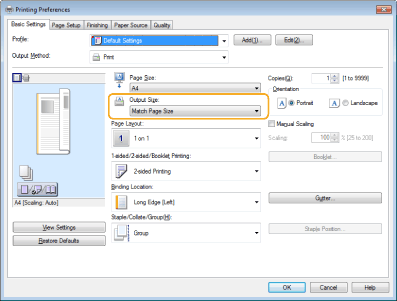
Match [Output Size] in the printer driver with the size of paper to print on.
The orientation does not match on both sides of the paper when using two-sided printing.
Are the settings for two-sided printing correct?
Follow the procedure below to check the print settings.
1 | Select the orientation of the original on the print settings screen of the application. |
2 | On the [Basic Settings] screen of the driver, set [Orientation] to the same orientation you set in step 1.  |
3 | While checking the print preview, set [Page Layout] [Page Order] [1-sided/2-sided/Booklet Printing] [Binding Location]. |
 |
[Page Order] is displayed when [Page Layout] is set to [2 on 1] or higher. |