Checking/Editing Device Information
This section describes the method for checking and editing the detailed information of devices for management.
Some changes are reflected to devices. You can also display the web page and the status details for the Remote UI of the devices.
Checking/Editing Detailed Information for Devices Separately
1.
Select the [Devices] menu > [Device List].
2.
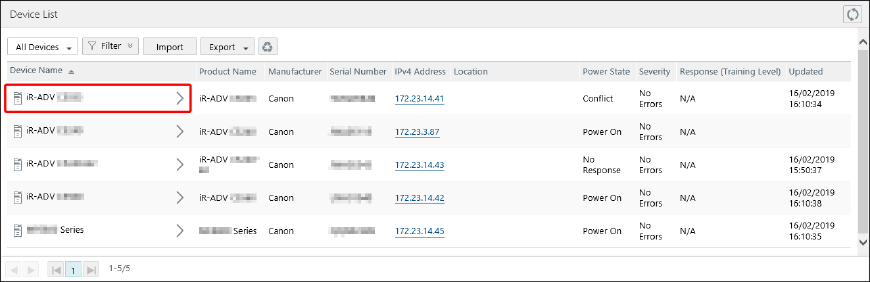
On the [Device List] page, select the device name of the target device from the list.
3.
Perform the required operation on the [Device Details] page.
Buttons
[Open Remote UI] | Displays the Remote UI of the device in a separate window. |
[To Detailed Status] | Displays the [Detailed Status] page of the device. The [Detailed Status] page is the same as the page displayed when either [Power State], [Severity], or [Response (Training Level)] is clicked on the [Device List] page. |
Tabs
[Basic Device Info] | Displays the basic information. Some of the items can be edited. If you edit them, click [Update]. Changes to [Device Name] and [Location] are reflected to devices. The number of characters that can be set differs according to the device. Enter a string that does not exceed the maximum number of characters that can be set for the device. When a URL is specified in [Link], [  ] is displayed in the [Link] column of the device list. Click [] to open the page of the URL. For details on displaying the [Link] column in the device list, see the following. ] is displayed in the [Link] column of the device list. Click [] to open the page of the URL. For details on displaying the [Link] column in the device list, see the following. |
[Device-Specific Info] | Displays the detailed information. |
Batch Editing Detailed Information
The same settings can be specified for multiple devices.
1.
Select the [Devices] menu > [Device Batch Processing] > [Batch Configure Device Information].
2.
In [Basic Device Info], select the information to change, and enter or select the new information.
3.
In [Target Devices], specify the target devices.
Click [Groups] or [Devices], and select the target device groups or devices.
If you selected [Devices], you can apply a filter to filter the devices displayed in the list.
A maximum of 5,000 devices can be selected at once.

Click [Selected], and confirm that the selected devices and device groups are displayed.
Click [Update].
NOTE |
Changes to [Location] are reflected to devices. The number of characters that can be set differs according to the device. Enter a string that does not exceed the maximum number of characters that can be set for the device. When a URL is specified in [Link], [ ] is displayed in the [Link] column of the device list. Click [] to open the page of the URL. For details on displaying the [Link] column in the device list, see the following. |
Checking the Detailed Status for Individual Devices
The detailed status retrieved by a built-in task (Monitor Printers) can be checked for each device.
1.
Select [Devices] menu > [Device List].
2.
Click [Power State], [Severity], or [Response (Training Level)] for the device to check on the [Device List] page.
3.
Perform the required operation in the [Detailed Status] page.
Buttons
[Open Remote UI] | Displays the Remote UI of the device in a separate window. |
[To Device Details] | Displays the [Device Details] page. The [Device Details] page is the same as the page displayed when a device name is clicked on the [Device List] page. |
[Latest Status] Tab
Displays the latest status information retrieved from the device. You can check the counter values, error information, paper source information, and consumable information, etc.
[Time Since Last Error] | Displays the time that has elapsed from device startup to status retrieval. |
[Counter (Cumulative)] | Displays the counter total values from device shipping to status retrieval. |
[History] Tab
Displays the history of the error information.
You can click history to check the status information at that time on the [Detailed Status (History)] page.
Common Items on the [Latest Status] Tab/[History] Tab/[Detailed Status (History)] Page
[Error Information]
Displays the information collected from prtAlertTable in the standard printer MIB defined in RFC 3805.
[Error Content] | Displays an overview of the error. |
[Severity] | Displays the error priority as indicated below. Service Calls (Priority: High) Errors (Priority: Normal) Warnings (Priority: Low) |
[Response (Training Level)] | Displays the skill level required for fixing the error. |
[Group] | Displays the type of sub unit that caused the error. |
[Group Index] | Displays the index that caused the error in the sub unit that caused the error. |
[Duration] | Displays the time that the error continued for. |
[Details] | Displays the content of the error. The displayed content differs according to the manufacturer and product, etc. |
Paper Source Information
Displays the information collected from prtMarkerSuppliesTable and prtMarkerColorantTable in the standard printer MIB defined in RFC 3805.
Consumables Information
Displays the information collected from prtInputTable in the standard printer MIB defined in RFC 3805.