Notifying You by E-Mail of the Completion of Sending
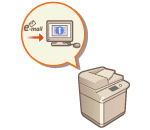 | You can receive an e-mail notifying you that sending documents is complete. Even if documents are waiting to be sent, you can use your computer or portable device to check whether sending documents is complete, giving you reassurance. When an error occurs, you are notified of destinations whose documents failed to be sent. |
 |
To select the destination to notify from <Address Book>, it is necessary to register the destination in advance. Registering Destinations in the Address Book To select <Send to Myself> as the destination to notify, it is necessary to register your e-mail address in the user information in advance, and log in using personal authentication management. Registering User Information in the Local Device |
1
Place the original. Placing Originals
2
Press <Fax>. <Home> Screen
3
Specify the destination on the Fax Basic Features screen. Fax Basic Features Screen
4
Specify the scan settings as necessary. Basic Operations for Sending Faxes
5
Press <Options>  <Job Done Notice>.
<Job Done Notice>.6
Select the notification timing, and set the destination to notify.
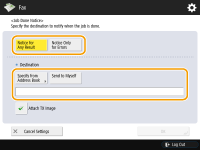
If you select <Notice for Any Result>, a notification e-mail is sent for each send job. If you select <Notice Only for Errors>, a notification e-mail is sent only when an error occurs.
For more information on how to view and use the Address Book, see Address Book.
If you want to check the content of the sent document, select <Attach TX Image> to attach the first page of the document as a PDF file to a notification e-mail.
7
Press <OK> <Close>.
<Close>.8
Press  (Start).
(Start).Originals are scanned and sending starts. When sending is complete, the notification e-mail is sent to the specified address.