Changes to Server Information Registration
 (Ver. 3.12-)
Support for Specifying Domains in IP Addresses When Configuring Active Directory Server Authentication
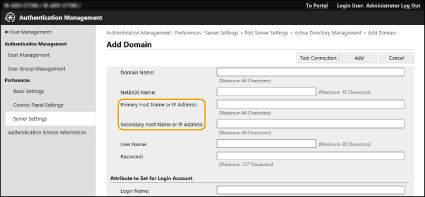
When you are specifying the Active Directory domain manually, you can now specify an IPv4 address instead of a host name. Access the Active Directory server by entering the host name or IPv4 address.
 (Ver. 3.15-)
Support for Specifying the Level When Performing Active Directory Server Authentication
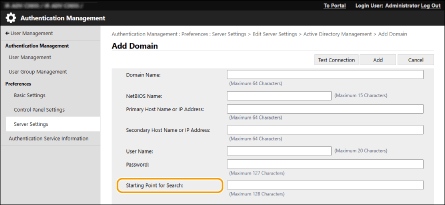
You can now specify the location (level) to search for user information when you perform Active Directory server authentication. You can configure settings so that only user accounts registered to a specific organization unit (OU) are subject to authentication.
 (Ver. 3.18-)
Support for Setting Microsoft Entra ID Information
Microsoft Entra ID information can be set in [Default Domain of Login Destination] when registering server information.
 Specifying the Microsoft Entra ID Information
If you use Microsoft Entra ID as an authentication server, register the application with Microsoft Entra ID. Registering an Application in Microsoft Entra ID
1 | Select the [Use Microsoft Entra ID] checkbox. | ||
2 | Click [Domain Settings]. The [Microsoft Entra ID Domain Settings] screen is displayed. | ||
3 | Specify the Microsoft Entra ID information. 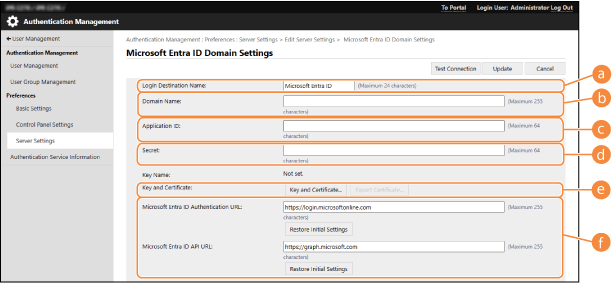  [Login Destination Name] [Login Destination Name]Enter the name to be displayed at the login destination. * You cannot use control characters or spaces.  [Domain Name] [Domain Name]Enter the domain name of the Microsoft Entra ID that is the login destination.  [Application ID] [Application ID]Enter the application (client) ID.  [Secret] [Secret]Enter the secret generated by Microsoft Entra ID. You do not need to enter this when [Key and Certificate] is used.  [Key and Certificate] [Key and Certificate]Press [Key and Certificate] when you use a key and certificate. You can press [Export Certificate] to export the certificate to be registered to Microsoft Entra ID.  [Microsoft Entra ID Authentication URL] and[Microsoft Entra ID API URL] [Microsoft Entra ID Authentication URL] and[Microsoft Entra ID API URL]Enter the URLs. Depending on your cloud environment, you may need to change the settings. | ||
4 | Specify the attributes. 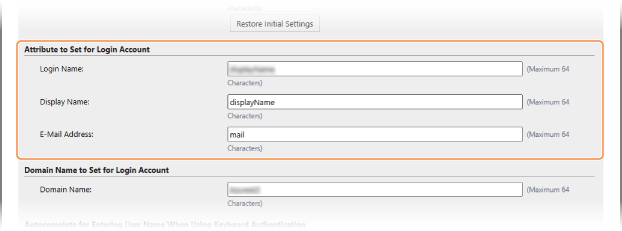 [Attribute to Set for Login Account] Enter the attributes for the login name, display name, and e-mail address of each user account on the server. [Login Name] From the pulldown menu, select the attribute for the login name of each user account on the server. *To specify an attribute not displayed in the pulldown menu, you can enter it directly. [WindowsLogonName]: displayName is obtained from Microsoft Entra ID. displayName is changed as follows to create the login name:
[displayName]: displayName obtained from Microsoft Entra ID becomes the login name. [userPrincipalName]: userPrincipalName obtained from Microsoft Entra ID becomes the login name. [userPrincipalName-Prefix]: The portion before "@" in userPrincipalName obtained from Microsoft Entra ID becomes the login name. Example: When userPrincipalName is "user.002@mail.test," the login name becomes "user.002." [Display Name] and [E-Mail Address] Enter the attributes for the display name and e-mail address of each user account on the server. | ||
5 | Specify the domain name of the login destination in [Domain Name] under [Domain Name to Set for Login Account]. | ||
6 | Specify the settings in [Autocomplete for Entering User Name When Using Keyboard Authentication] under [Domain Name to Autocomplete]. Enter the name of the domain for which to perform autocomplete. Normally, set the same name as entered in [Domain Name]. | ||
7 | Click [Connection Test] to test the connection. | ||
8 | Click [Update]. The screen returns to the [Edit Server Settings] screen. |
Registering an Application in Microsoft Entra ID
Use the following procedure to register an application in Microsoft Entra ID.
The registration process may change with service updates. For more information, see the Microsoft website.
The registration process may change with service updates. For more information, see the Microsoft website.
1
Log in to Microsoft Entra ID.
2
In the navigation menu, click [Microsoft Entra ID].
3
Register the application.
1 | In the navigation menu, click [App registrations] > [Register New Flow]. |
2 | Enter the name of the application. You can enter any name. Input example: Canon <printer name> Login |
3 | Select the type of account, and click [Register]. The application (client) ID is generated. Make a note of the generated ID. |
4
Create a secret or register a certificate.
When Creating a Secret
1 | In the navigation menu, click [Certificates & secrets]. |
2 | Click [New client secret]. |
3 | In the [Add a client secret] dialog box, enter the description and expiry date, and click [Add]. A secret ID and value are created. Make a note of the created secret value. You do not need the secret ID. * The secret value is only displayed once. If you are unable to make a note of the value, create a new client secret. |
When Registering a Certificate
The certificate of the machine needs to be exported in advance. You can export the certificate when configuring the Microsoft Entra ID information. Specifying the Microsoft Entra ID Information
1 | In the navigation menu, click [Certificates & secrets]. |
2 | Click [Upload certificate]. |
3 | Select the file, and click [Add]. After the certificate is uploaded, make a note of the Thumbprint value. |
5
In the navigation menu, click [API permissions].
6
Click [Add a permissions].
7
Under [Request API permissions], select [Microsoft Graph].
8
Under the type of permissions, select [Delegated permissions], and grant permissions.
Grant the following permissions:
User.Read.All
Group.Read.All
GroupMember.Read.All
9
Under the type of permissions, select [Application permissions], and grant permissions.
Grant the following permissions:
User.Read.All
User.ReadWrite.All (when registering or deleting an IC card to or from the machine)
Group.Read.All
GroupMember.Read.All
* Use permissions when using IC card authentication or when you cannot log in to the machine due to a multifactor authentication error. This is not required depending on the function and environment used.
10
Click [Grant admin consent confirmation], and click [Yes].
Admin consent is granted to the selected permissions.
 (Ver.3.19-)
Changing the Maximum Number of Characters for Password When Configuring Server Authentication Settings
The maximum number of password characters has been changed for server authentication or destination registration. Setting a long password will enhance the security of the machine.
 |
Sharing address book and setting data is not supported with multifunction machine using an older firmware versionIf a multifunction machine with an older firmware version performs the following operations with a multifunction machine that supports this function, it may not operate correctly and a malfunction may occur. Be sure to update the firmware to the latest version before performing the operation. Individual Importing/Individual Exporting Batch Importing/Batch Exporting Device Information Delivery Synchronize Custom Settings Using the Remote Address Book Import/export using a CSV file |